
From the desk of Evan Marty, Director of Product Management – OvrC
Three weeks ago, we released an OvrC update that brought lots of new features to the platform and we were excited for our Partners to take it for a drive. But even with all our user-testing, we unfortunately missed on delivering the best user experience. In this blog I’ll provide an update on a) what we’re doing to fix the mobile UX; b) address feedback on our new Network Health feature and speed test changes; and c) summarize some of the other new features and improvements we’ve been making.
A. UX Updates for OvrC Web and Mobile
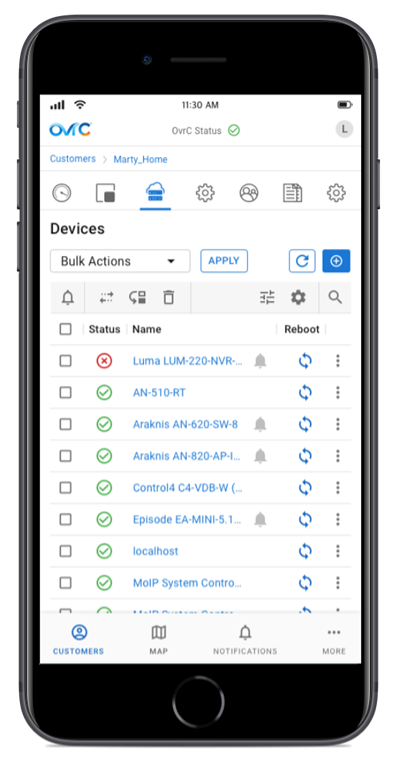
We heard you loud and clear. When you’re in OvrC, you are there to get a job done- like finding a device and rebooting it. And you do this a LOT via mobile, where screen real estate is limited. Our January update made navigating the Device List on small screens more difficult than it should be, so we’re actively working to fix it. In future updates (exact dates TBD but we’re expecting weeks not months) you will see a redesigned Device List that more resembles the old one you loved plus some notable improvements:
* Below is a design mockup we have been reviewing with user-experience testers. Please note, this is concept only and subject to change before release. Want to test drive new OvrC features before they are released? Sign up for our Beta program!
B. Network Health and Changes to Speed Tests
To truly understand network performance requires more than just internet speed tests. So, in last month’s OvrC release we released Network Health. This new feature adds latency testing for both Local Area Network (LAN) and Wide Area Network (WAN) to provide better visibility to the entire network. As noted in the previous OvrC release, with this update automated speed tests have now been reduced to once every 24 hours.
Network Health was introduced to provide better visibility into both internet performance and local network performance, while reducing potential impact to the customer’s network. Speed tests could negatively impact a customer network by overloading it and are not frequent enough to give you a good total picture. With the addition of WAN/LAN latency tests, we are able to run much more frequent tests without impact to the network.
Learn more about Network Health
C. Other Features & Fixes
OvrC Connect Changes and Bug Fixes
On February 3, we corrected known issues within the OvrC Connect app that were affecting customers’ ability to use certain portions of the OvrC Connect mobile application.
ICYMI
We have made some great updates to the OvrC platform in recent weeks. Here are a few highlights in case you missed them:
As always, we continue to evolve our product based on your feedback. Please provide your thoughts and ideas to [email protected]. Thank you!