
The new Self-Serve Mapping Tools in OvrC offer greater clarity and control over how Control4 accounts and projects map to OvrC locations. The tools, available in both the Account Management Dashboard and the Control & Automation category, allow you to identify and correct mapping issues on your own, using built-in guidance.
Problem
Mapping mismatches create obstacles with Dealer of Record changes, remote access and troubleshooting and OS upgrades, often requiring Support intervention to resolve.
Solution
The new Self-Serve Mapping Tools gives dealers visibility and self-serve tools to identify and fix mapping issues directly in OvrC, eliminating delays and reliance on Support for fixes.
Benefits
• Accurate mapping is essential to ensure systems are fully prepared for the upcoming X4 upgrades with optional Connect subscription in 2026.
• As Control4 and OvrC data experiences converge and rely on accurate mapping, this tool helps dealers future-proof their projects and avoid disruption when upgrading systems.
• Ultimately, this improvement can reduce friction in the service process, saving time and improving customer satisfaction.
Where to Find the Self-Serve Mapping Tools
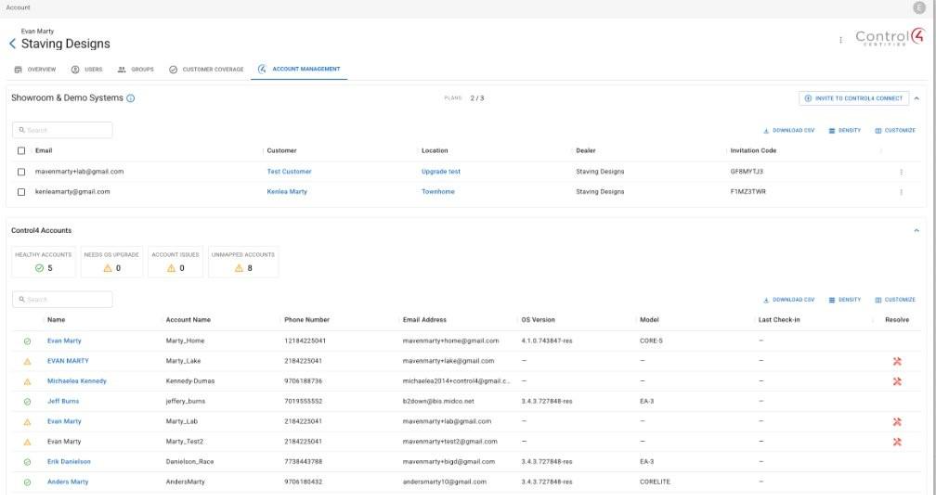
Find the Self-Serve Mapping Tools on the Control4 Account Management tab within the Account page in OvrC. This tab replaces the former Showroom & Demo Systems tab.
The Control4 Account Management tab now includes additional functionality, allowing dealers to view the mapping status of all Control4 customer accounts. If a mapping issue is detected, select Resolve to access the guided tools to fix the mapping directly in OvrC.
Note: The OvrC Account Owner can continue to view and manage Showroom & Demo Systems from within the Control4 Account Management tab.
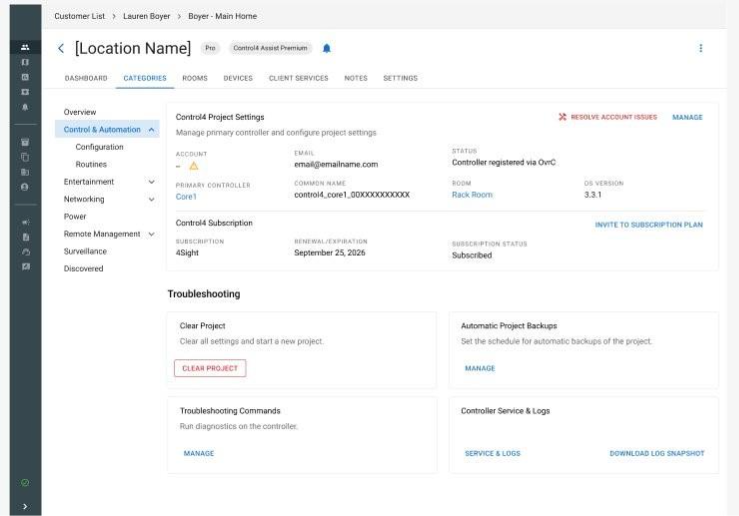
Dealers can also resolve mapping issues at the individual location level from the Control & Automation tab within a specific OvrC location.
For more information, search “Troubleshooting Control4 Connect registration issues” in Tech Community.
Visit Your OvrC Account Dashboard
Log in to OvrC today to use the Control4 Self-Serve Mapping Tools.