
Dec
06

Network Controls with Araknis Products

December 2017 OvrC Release – Network Controls with Araknis Products

With this OvrC release, you can give your clients the ability to manage Wi-Fi access of other users at their location, either manually or on a schedule, all from OvrC Home. You can also provide clients the ability to filter web content at a location, but this feature is in its final BETA phases.

OvrC Home: Wireless Access Management

The Feature

When you enable this feature, it gives your clients the ability to group any number of wireless clients into a “profile” and the ability to revoke/grant Wi-Fi access to those associated devices, either ad hoc or on a pre-determined schedule from OvrC Home. This gives clients much more control over how Internet is being used at their location.
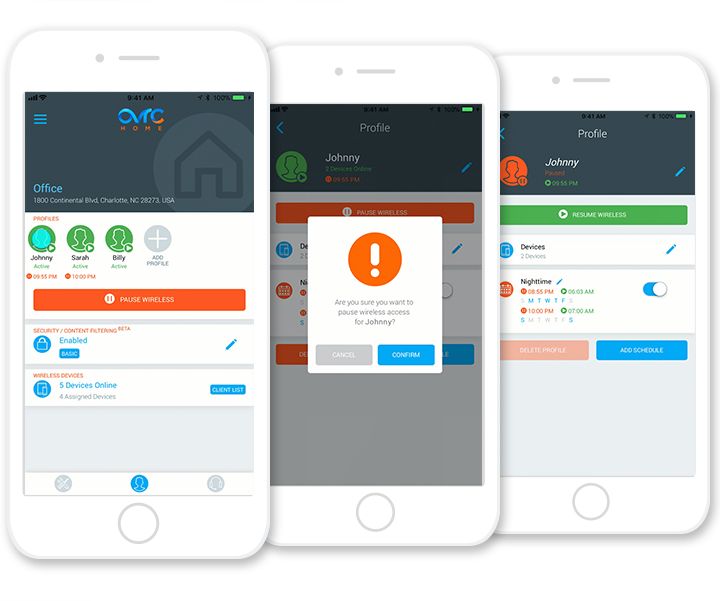
Residential Use Case – Managing Children’s Internet Access

In the residential scenario, the perfect use case for this is giving parents more control over their children’s access to the Internet. As an example, your client can revoke Wi-Fi access to his kids’ tablet after 9pm to ensure he’s going to bed.

How It Works

Since OvrC is natively integrated to Araknis access points, we leverage an embedded feature of the access points called Mac Filtering. When you “pause” Internet for a device, OvrC modifies the mac filtering table for the associated access points at the location.

Requirements & Limitations

As we use the native technologies built into the Araknis access points, this feature requires the use of Araknis access points using the latest firmware at the location. This is backwards compatible to any model of Araknis access points. This also means that wired and cellular connections cannot be controlled at this time.

Deploy this Feature Remotely

Great news! Since we support this feature on all generations of the Araknis access points, you can set this up and deploy it for existing and new clients from OvrC, all without having to roll a truck. If they already are using OvrC Home, just have them log out and back in to see the latest features that you enabled. To learn more about how to set this up, watch the step-by-step video below.

Provide Clients a Gift for the Holidays & Let Them Know You Care!

With holidays coming up, this would be a great service that you could send them as a thank you for being a loyal customer and continue to add value as their go-to technology professional.

Client Support & Communication

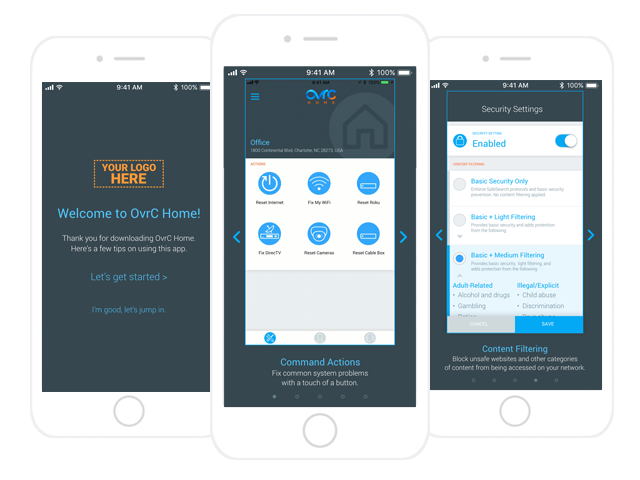
To make it even easier for you, we’ve built-in some self-help content in the app for clients to get a quick preview of what they could do with the new features.
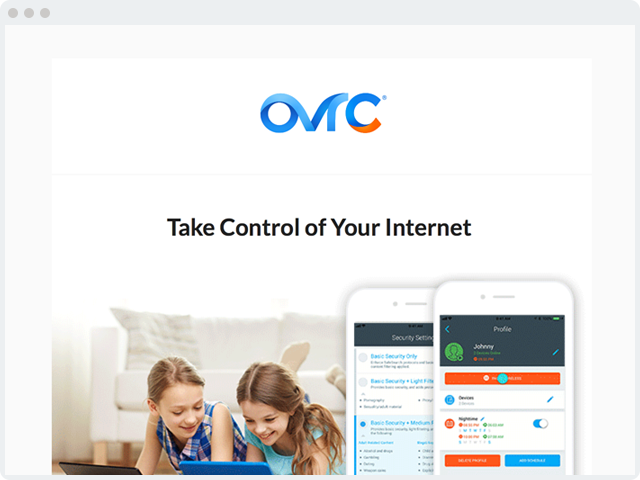
We’ve also created a templated email with hi-res graphics that you can use in your communication to the client. You can find the email template here.
What’s the Catch? – Nada

There is no catch. This is a value-added feature we’ve added to our access points so that you may be able to deliver more value to your clients. No additional hardware or licensing required. Happy holidays!

OvrC Home: Content Filtering

This feature gives your clients that ability to filter out and block select URLs from being accessed at their location. They are able to select one of four levels that range from just blocking malicious URLs all the way up to very stringent filters.
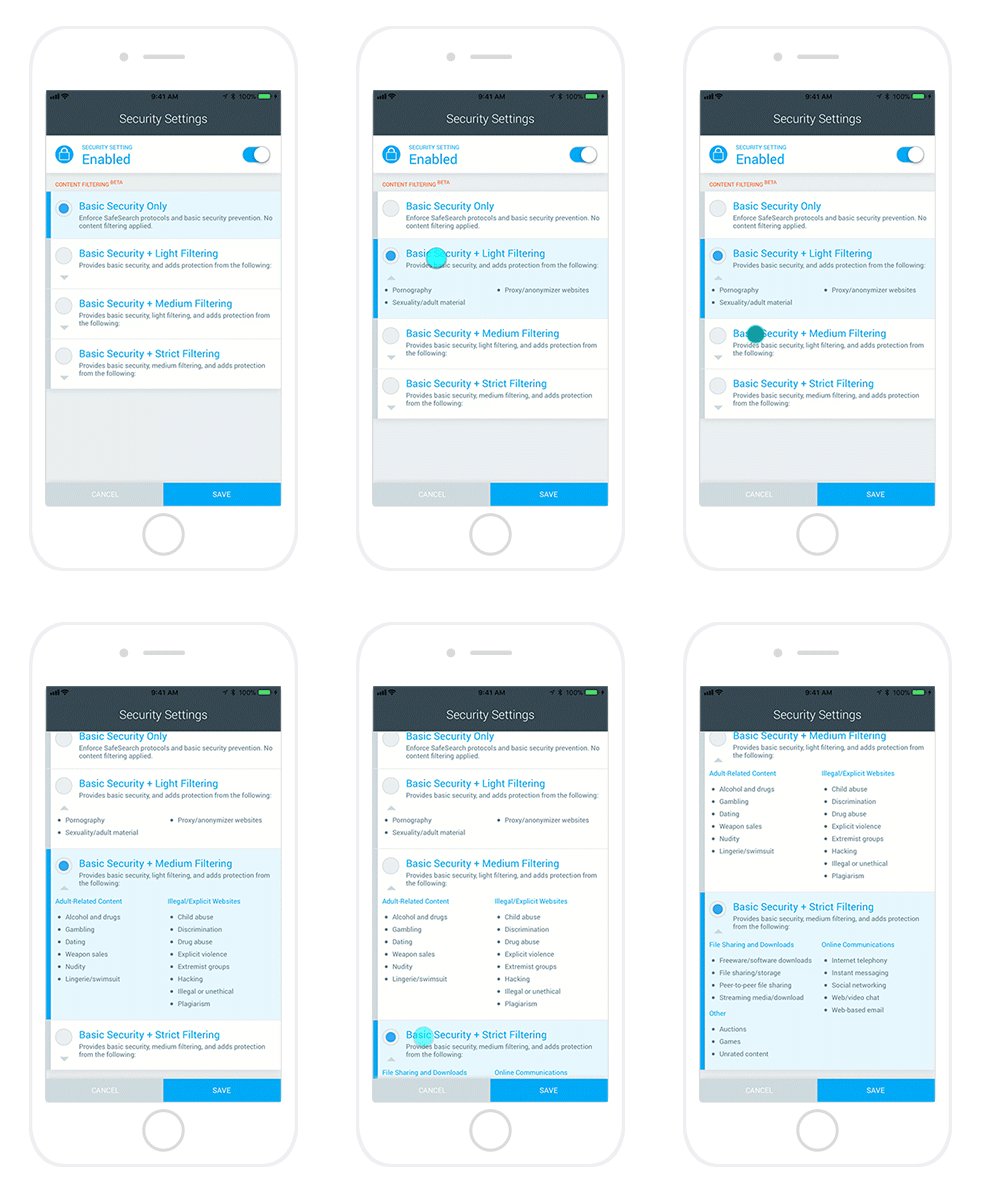
This feature does require the use of Araknis routers as we are leveraging the native capabilities to make changes in the configurations. This feature is in its final stages of BETA, so we encourage you to test the feature and provide feedback at [email protected]. Thanks!

Read more
Dec
05

Win a $500 Product Credit

No items found.

Just leave a review on anything you�ve purchased to be entered to win! Submit a review by going to the product page, selecting 'Reviews' and then 'Write a Review'. Each product review submitted earns the entrant (1) entry. Begins 11/27/17 and ends 12/22/17. View rules and conditions

Read more
Nov
30

NEW Additions to the Atlona Line

We now offer a 4K HDR HDMI to HDMI 4x4 Matrix Switcher and extender set in our Atlona line-up. Visit each product page to learn more.

Read more
Nov
28

SnapRap: Visualint�s Virtual Officer Is An All-In-One Solution

This month, we went to Alex Patrao - Product Manager for Surveillance, to get the details on Visualint�s unique all-in-one Virtual Officer solution, and find out why nothing on the market today can compare. Find out more >>

Read more
Nov
17

NOW AVAILABLE: BenQ�s LK970 Laser 4K Ultra HD Projector

This 4K laser-core projector is ideal for entertainment simulators and gallery exhibitions - with 5000 ANSI-lumen brightness, its supreme picture quality reproduces true-to-life images for an immersive audience experience. Check it out.

Read more
Nov
15

Check Out The Exciting Updates And Improvements Autonomic Has To Offer

  • The AU-MMS-1E is back in stock and better than ever- with ALL NEW Firmware that includes improvements to control system integration, streaming services, and overall solution reliability including AirPlay. Updated firmware files are available in the Support tab of the product page.
  • Spotify Connect is now available on the MMS-1e, providing additional Spotify functionality to the native support within any major control system.
  • OvrC Compatibility in addition to the MMS-1e, the M-120e, M-401e, and M-801e amplifiers are now on OvrC! See all Autonomic has to offer.
Read more
Nov
07

NEW Visualint�s Virtual Officer

Explore the new all-in-one surveillance solution from Visualint - check it out.

Read more
Oct
25

Check Out Additions to the Platinum Tools Line

In the ongoing effort to make dealer�s lives easier - this new product lineup offers a group of tools that are both innovative and easy to use, designed to make jobs easier and quicker. Check out the new additions.

Read more
Oct
20

VIDEO: Why Acoustic Treatments are a Great Idea

See why acoustic treatments are a great idea for your next install by watching the video above.

Read more
Oct
18

URGENT: Network security issue impacting all Wi-Fi enabled devices.

Security researchers have recently published a wireless exploit titled �Key Reinstallation Attacks� (abbreviated as KRACK), indicating users of any wireless device currently face a severe security risk.This vulnerability affects any device that uses the Wireless Protected Access 2 (WPA2) security mechanism. WPA2 is currently the industry�s most popular and recommended security standard for 802.11 wireless networks.In some cases, this vulnerability may allow an attacker to manipulate data on a Wi-Fi network, or inject new data. This means hackers could steal user passwords and financial data, or even manipulate commands to wire money to themselves.Please note: an attacker needs to be physically in range of a target Wi-Fi network to carry out the attacks.To prevent possible attacks, you must update affected devices as soon as security updates become available.To reiterate, every Wi-Fi device is affected by this vulnerability. This includes end-user devices such as smartphones, tablets, and laptops; as well as IoT products like smart thermostats, fridges, locks, etc.SnapAV Affected ProductsBelow are affected SnapAV products and what we are doing to fix the problem.Araknis Networks - Wireless Access PointsWe are currently working on a firmware update, which will be available on SnapAV�s website, as well as OvrC. If you have claimed the access points on OvrC, the fix will be available as a firmware update, which can be applied to all customers remotely.If you do NOT have their access points claimed on OvrC, you need to either

  1. Claim them on OvrC, or
  2. Download the update file from our Support page and remotely log in to the local UI of the access points and apply the firmware update. This can be done via remote port forwarding or VPN access to the site.

Autonomic - 1e Music StreamerWe are currently working on a firmware update, which will be available on SnapAV�s website.Next Steps for YouAs mentioned above, we are currently working on a fix for all SnapAV Wi-Fi products. Please be on the lookout for further communications in the coming weeks as one is tested and validated.In the meantime, you can take the following steps to help reduce your customers� risk when using Araknis access points:

  1. Disable Fast Roaming
  2. Keep access point in Access Point Mode (NOT Repeater Mode)

What to Tell Your CustomersIf customers inquire about the KRACK wireless exploit, remind them that it affects their mobile devices and IoT devices on any network they connect to. They should use wireless networks with caution until each device manufacturer issues an update and it has been applied.Therefore, they should take these defensive steps:

  1. Update their personal devices to latest firmware as soon as it becomes available.
  2. Make sure their frequently visited sites (e.g. Facebook) and financial services websites (e.g. banks) show a lock on the browser tab to indicate a secure connection.
  3. Be aware of who is using their Wi-Fi network since any potential attack must be issued within physical range of the network.

Further InformationIf you have any questions or concerns, please contact Customer Support at 866-424-4489.

Read more
Thank you! Your submission has been received!
Oops! Something went wrong while submitting the form.
No items found.
Thank you! Your submission has been received!
Oops! Something went wrong while submitting the form.