
WattBox is becoming the intelligence at the heart of every install. With the new Power Insights Dashboard, at no extra cost, installers can track outlet-level performance, uncover energy inefficiencies, and analyze data trends that impact uptime. Paired with OvrC for remote management, scheduling, and automation, WattBox gives pros a smarter, more connected way to deploy, monitor, and maintain power.
Power issues aren’t always obvious. Devices reboot, systems drop offline, and it can be unclear whether the problem is the device, the power, or something else. The Power Insights Dashboard is designed to remove some of that guesswork.
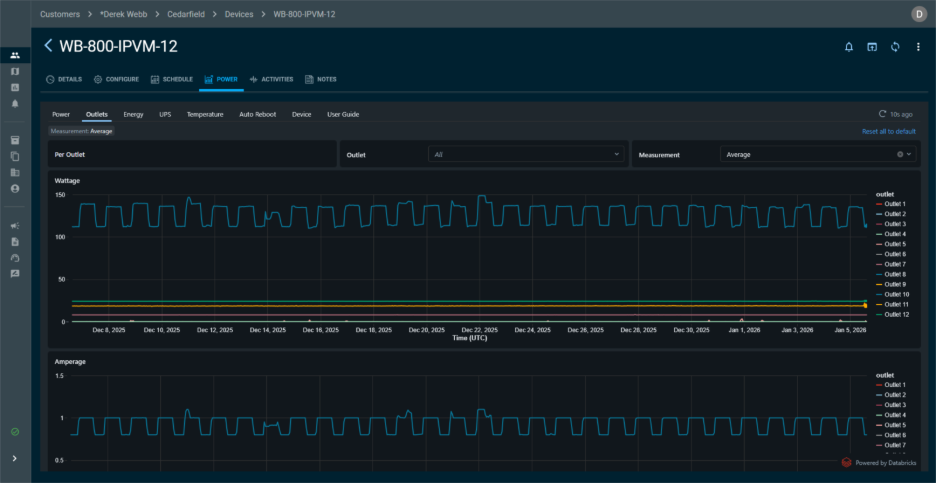
See Power Trends That Matter
Power Insights highlights meaningful trends so you can quickly identify patterns that impact uptime.
This approach keeps the dashboard fast and readable while giving you the insights needed to troubleshoot effectively.
Make Decisions Before Problems Escalate
With actionable insights in hand, you can prevent downtime, reduce service calls, and keep systems performing at their best.
Gain Visibility at Every Level
Whether it’s outlet-level control or device-level insights, Power Insights gives you the visibility you need.
All of this works seamlessly with OvrC, keeping monitoring, control, scheduling, and automation in one place.
Learn How to Leverage Your Data
For pros who want to go deeper, the Power Insights Dashboard User Guide shows how data is collected and how to read the charts.
WattBox delivers reliable, scalable power control for today’s connected environments. With IP-enabled PDUs, seamless Q-SYS integration, Double Conversion UPS backup, and OvrC remote management, it’s the complete platform integrators trust for commercial installs.
IP Power Distribution
Commercial systems are demanding more power, more control, and better protection, but most power solutions aren’t built to scale with modern commercial installs.
WattBox delivers:
OvrC
OvrC gives integrators complete, centralized control of WattBox power devices, making multi-location management simple, efficient, and reliable.
WattBox + OvrC delivers:
Q-SYS Integration
Power control is often disconnected from the main control system, creating added complexity for commercial integrations.
WattBox delivers:
Double Conversion UPS
Even a momentary power loss can disrupt sensitive systems and cause costly downtime.
WattBox delivers:
No matter the project, WattBox has the solutions to keep you powered, protected, and ready for what’s next.
As an award-winning leader in smart power management, WattBox continues to deliver reliable, scalable solutions designed for modern integrations.
You already trust WattBox to manage power, and now you can take it even further. With Q-SYS integration, WattBox control is built right into your AV automation platform, providing you with a single system for power, monitoring, and control. Integrators will need to first set up each device with OvrC.
With Q-SYS You’ll be able to:
It’s the WattBox reliability you know, now with Q-SYS control to streamline, simplify, and supercharge your commercial AV projects.
Trust WattBox for your commercial installs:
New OvrC features for Wattbox devices allow you to deploy faster and manage easier.
BULK FIRMWARE UPDATES
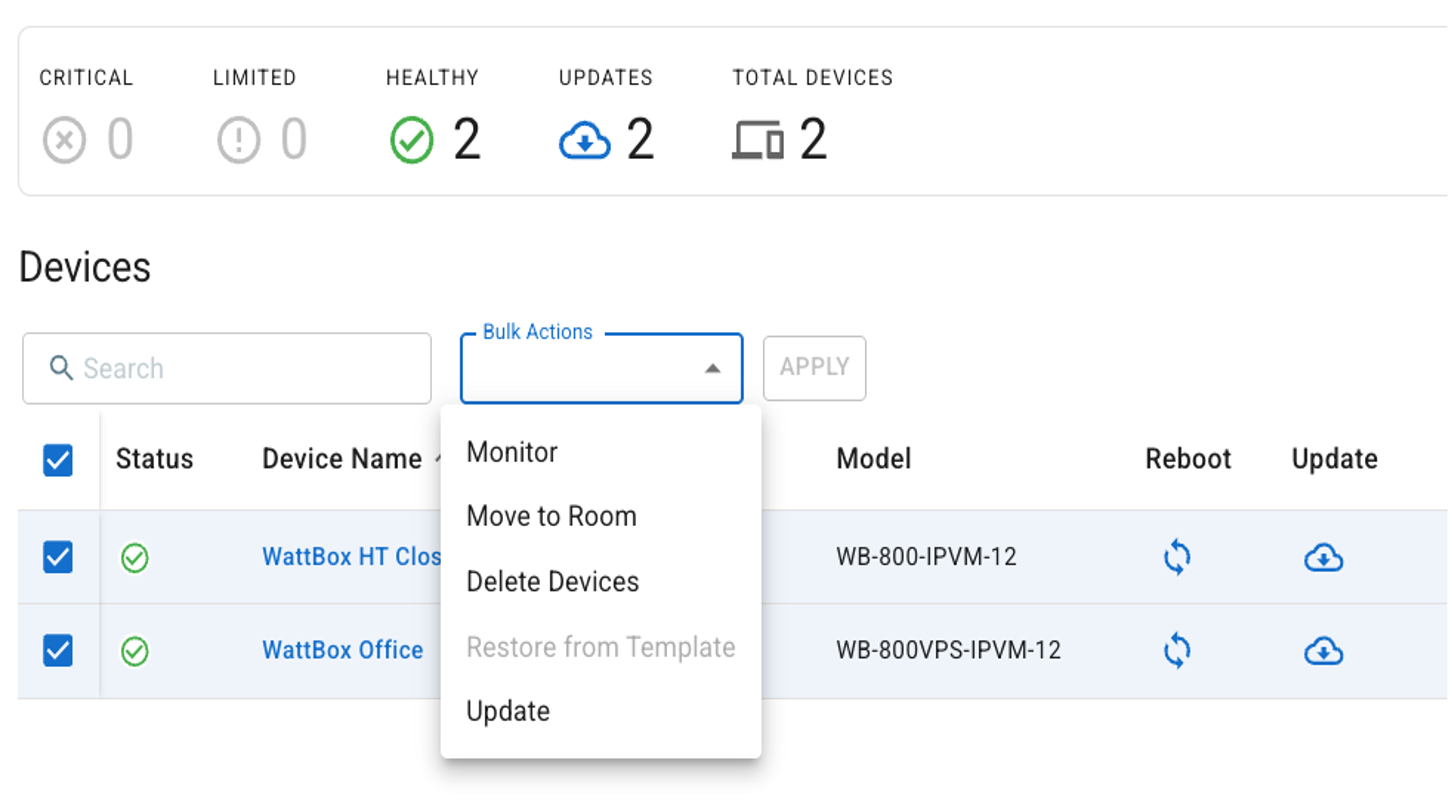
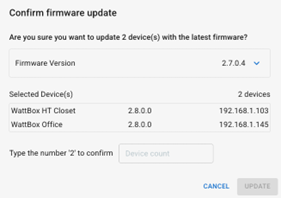
All Wattbox 150, 250 and 800 series* devices can now be updated simultaneously with a single button click, exponentially reducing the time that it takes to deploy new installations, or update your customer’s existing systems.
The What’s New toggle at the top right of OvrC enables this new feature; to access Bulk Firmware Updates:
NOTE: Wattbox Bulk Firmware Updates are currently limited to 200 devices per update instance
NOTE: Step-wise updates will be automatically managed when necessary, but the user will need to re-select and update again once that step is complete.
*Bulk firmware updates for legacy Wattbox 300 and 700 series devices will be coming soon.
NEW FIRMWARE ENABLES DEVICE TEMPLATES
In conjunction with this new feature, a new firmware update is now available for Wattbox 150, 250 and 800 series* devices, which enables the ability to BACKUP a device configuration to the cloud, which can then be RESTORED to a Wattbox of the same model and firmware version, allowing you to configure every Wattbox in a deployment in a fraction of the time it would normally take to configure just one.
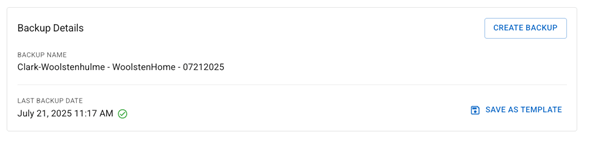
Device Templates allow you to create a ‘golden template’ for each Wattbox 150, 250 and 800 SKU that includes all your common configurations. The cloud-stored BACKUPS can be applied locally to other devices, and after clicking SAVE AS TEMPLATE the configuration can be used for any future deployment in any other customer site. This also allows a remote-located technician to RESTORE a Device Template as soon as the devices have been physically installed and automatically claimed in OvrC.
The What’s New toggle at the top right of OvrC enables the new Device Template feature; BACKUP a Wattbox 150, 250 or 800 configurations:
NOTE: Device configuration file BACKUPS are stored in OvrC and can only be accessed by RESTORING to a device of the same model and firmware version. The cloud-stored BACKUP cannot be manually downloaded.
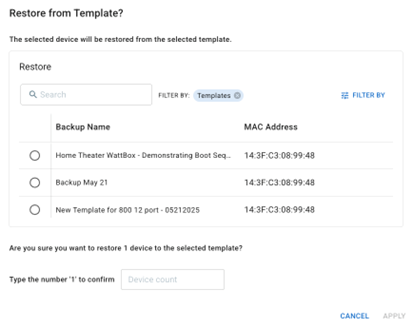
To RESTORE a Device Template to a Wattbox 150, 250 or 800:
NOTE: You can click CUSTOMIZE and VIEW BY in order to sort the device list by model and firmware
NOTE: There is currently a limit of 1 BACKUP per device and 5 TEMPLATES per Wattbox model
NOTE: OvrC Connect Macros are currently not saved in Backups nor Templates
*Device Templates for legacy Wattbox 300 and 700 series devices will be coming soon.
Over-Current Protection (OCP) is a feature built in WattBox units to protect your gear and installation from instances of excessive current. Over-Current Protection in the 800 Series WattBox protects from two types of excessive current:
When Over-Current Protection is triggered, ‘Device Activities’ in OvrC will differentiate between the two.
Ways to Troubleshoot
For Instantaneous OCP:
If a single outlet is off:
If 3 consecutive outlet groups turn off (1 -3, 4- 6, etc.)
For Constant OCP:
For additional information, please contact Tech Support at 1-888-400-4072 or by email at [email protected]
We’re excited to unveil a game-changing addition to the WattBox® lineup: our new online double conversion UPS units featuring zero transfer time to battery backup and advanced OvrC capabilities. This premium technology ensures uninterrupted power for your most critical, power-sensitive equipment, eliminating delays or disruptions during power transitions.
WattBox has just rolled out two exciting updates to the OvrC platform, designed to give integrators more control, flexibility, and efficiency when managing WattBox deployments.
WattBox Faceplates: Now Recognized as Individual Devices
Integrators can now manage faceplates directly within OvrC, reducing complexity in installations when working with the WB-800-FP (Standalone Device) and WB-800ICH1U-IPVM-8 models.
This improvement allows integrators clearer visibility and easier access for setup and management, independent of the connected WattBox units.
Advanced Faceplate Button Customization
Each button on the faceplate B1, B2, B1+B2, and Power- can now execute specific actions across up to three connected WattBox devices. With these new actions, users can perform Discreet On and Off, Reset, and Disable (for added security).
This customization enables integrators to create powerful automation sequences, allowing users to control multiple outlets or devices at the press of a button. This means greater flexibility and control for end-users while also decreasing the number of service calls needed for adjustments.
To get started with these updates, refer to the OvrC guide.
The UltraTech battery (IM-1290F2) has been approved as a replacement battery for WattBox UPSs. This 12V 9Ah SLA battery is available for purchase on SnapAV.com.
The ability of an internal UPS battery to hold a charge decreases over time. With UltraTech replacement batteries, you can return the UPS unit back to peak performance without having to buy a new one.
The UltraTech battery benefits your WattBox UPS deployments by helping to keep the unit fully charged, backed up, and running its best. To shop now or to learn more, click the links below.
Altronix is a leading global provider of critical power infrastructure. Their expansive product portfolio includes power distribution for access control, security systems, networking, surveillance, and more. With Altronix, integrators can expect the best in UL-listed, NDAA- and TAA-compliant power distribution hardware with a lifetime warranty to support their projects. These latest power and data solutions can be combined with PDK's mobile-first access control software so you can offer an iron-clad wall of security for customers.
Trove Enclosures
Easily integrate Altronix power with access controllers and accessories from the industry�s leading manufacturers. The removable back panels allow you to configure and pretest before arriving on-site, saving you time and money.
Snap One & ADI: Better Together
ADI and Snap One are committed to offering you the best products to better serve your customers and streamline your shopping experience.
Greater flexibility is here! Whether connecting to a plug just out of reach or organizing a rack in a tight space, our new WattBox� 15A and 20A IP Power Cords and Extension Cords offer the versatility needed to tackle any install challenge. With multiple lengths and orientations, you�ll find the right fit for clean, efficient installs.
Snap One is thrilled to offer SurgeX's lineup of power protection and conditioning solutions. From advanced power management software to standalone and rack-mount equipment, sequencing, branch circuits, and sidecars. SurgeX has it all. Known for unparalleled performance and reliability, SurgeX ensures your next job is powered with premium protection. Explore the possibilities and shop now.
Take system protection and control to the next level with the new WattBox Temperature Probe. This must-have accessory expands the capabilities of the 800 and 820 Series PDUs by enabling advanced Actions within OvrC, giving you more ways to safeguard and manage your customers' systems.
Easily monitor and react to temperature changes to keep systems running smoothly.
New WB-820-IPVM-2 two-outlet 20-amp WattBox PDU now available. This latest addition brings the proven performance and reliability of the 800 series to a powerful 20-amp, IP enabled PDU, ensuring you get the best in power management and protection. This advanced PDU is monitored and managed remotely via OvrC for enhanced control and fewer service calls.
Introducing the newest member of the WattBox 820 Series family: The WattBox 20 Amp PDU. Available in 2-, 8-, and 12-outlet models, this new addition brings the proven performance and reliability of the 800 series to a powerful 20-amp lineup, ensuring you get the best in power management and protection. This advanced PDU monitors voltage and internet connectivity, performs quick resets with local buttons on the 8-outlet model, and can be managed remotely via OvrC� for enhanced control and fewer service calls
Committed to providing end users and integrators alike with the best experience, the latest WattBox firmware update focuses on three main improvements that allow you to:
In addition to these key features, this rollout also adds functionality to OvrC, improves security, and provides future hardware support. These firmware updates take effect automatically, with no reset required.
Follow the links below for additional information about the latest firmware:
WattBox 800 Series Firmware Release Notes: http://snp1.co/wb-800-rn
WattBox 150/250 Firmware Release Notes: http://snp1.co/wb-150-250-rn
WattBox 250I Firmware Release Notes: http://snp1.co/wb-250i-rn
Designed for convenience, the newest accessory is the perfect complement to the Wattbox 800. Using OvrC's simple command setup, you can place the trigger conveniently for your customers, allowing WattBox to take care of the rest. You'll enjoy an integrated wire channel, easy connection and setup, and your customers will enjoy a simple solution to get their system back up and running; no service call needed.
Already have your own trigger button? Pair it with our new multi-functional Smart Adapter to provide your customers' with tailored troubleshooting capabilities for their WattBox 800 Series systems, all conveniently configured in OvrC.
WattBox OvrC Enhancements
In our efforts to continuously improve the WattBox experience via OvrC, we have added new features that can be found on the Configuration tab. To take advantage of all the newest features and capabilities, make sure you are updated to the latest firmware version 2.3.0.8.
LED Dimming
Thanks to Partner feedback, we have added an LED brightness control feature on all WattBox devices with Faceplates. Take control of the brightness level of the LEDs on WattBox faceplates using a simple slider in OvrC.
Models with this feature available:
WB-800CH1U-IPVM-8
WB-800-FP
WB-800ICH1U-IPVM-8
WB-800I-FP
Power Performance Notifications
Closely mange power on an installation with Power Performance Notifications. Set thresholds for Voltage, Power and Current. When the device is outside of the set thresholds, it will go into a limited state (not critical, but not green) and send a notification, giving you the control and information, you need.
Safe Voltage Toggle
Now have even more control over your installation. Available on certain WattBox devices, we�re offering the ability to enable and disable Safe Voltage directly from OvrC.
Models with this feature available:
WB-800CH1U-IPVM-8
WB-800ICH1U-IPVM-8
WB-800I-IPVM-6
WB-800IVPS-IPVM-12
This new, ML-based PC software replaces the previous Flash-based software and is used to monitor and manage WattBox UPS units, giving access to the GUI and graceful shutdown control.
In the event of a power loss, the UPS will automatically instruct the PC to save your files, then safely shut down the computer in an intelligent and orderly manner, avoiding costly damage to critical components.
WattBox UPS units that will receive the update include WB-OVRC-UPS-625-8, WB-OVRC-UPS-850-8, WB-OVRC-UPS-1100-1, WB-OVRC-UPS-1500-1, WB-OVRC-UPS-2000-1, WB-UPS-1100-8, WB-UPS-1500-8, WB-UPS-2000-1.
Bring local control to up to three WattBox 800 Series PDUs with the 800 Series WattBox Standalone Faceplate. With LED indicators and local reset for individual PDUs, the faceplate enables control at the rack for both you and your customer. Additionally, the faceplate display and LED indicators tell you if the PDUs are properly grounded, connected to the internet, if there is safe voltage, and the surge protection status. It even provides both voltage and current readings, including two buttons for local reset of individual PDUs.
On 04/27/2022, we released WattBox firmware version 2.2.1.2 to add several features and bug fixes. Although this firmware went through an extensive Beta program, after its release there have been a few recent reports that, under specific conditions, some units have experienced outlets resetting or turning off without a command issued to the device.
As a precaution, we will be leveraging OvrC to automatically push a previous version of firmware, 2.2.1.0, that eliminates this problem. We will begin this update on Monday, May 16th. This will not require any action from you and will be transparent to your customer(s) as it does not require any device reboots to take effect.
If you would like to manually update the WattBox firmware, you can do so through OvrC or manual file download from the WattBox product pages on our website.
We understand that WattBox is a critical component in your systems and apologize for any inconvenience or confusion this may have caused.
WattBox team
As part of our continued efforts to make the WattBox 800 Series the best power solution for pros, we are releasing firmware version 2.1.2.0.
Improved Over-Current Protection
This update increases the capabilities and performance of the 800 Series WattBox models listed below. We have improved the Over-Current Protection (OCP) feature by modifying the settings to ensure high current amplifiers do not falsely trip this feature, allowing for compatibility with more components. This firmware updates the OCP parameters, allowing for wider in-rush (Instantaneous Over-Current) and constant thresholds (Constant Over-Current), decreasing the instances of OCP tripping and turning outlets off.
PDU Restart Correction When Paired with a UPS
Additionally, we have addressed a bug that was making PDUs remember their last state when pairing an 800 Series PDU with a UPS. If the UPS is configured to shut down outlets before the battery drains and the battery completely drains, the PDU would remember the last state of those outlets being off and not turn them back on when power returns. This bug only happened to outlets that were set to enabled. With this update, outlets will now reset to their proper setting and the PDU will power back on when power is restored, even if the UPS battery is completely drained. This eliminates the need to manually press power to restore the PDU to its original state.
Additional Enhancements
Resolved Issues
Models Affected:
The newest addition to the 800 Series family brings the IP functionality you love in an 8-outlet, 1U rack-mountable form factor. With 8 individually controlled and metered outlets, plus an additional accessory outlet on the front of the device, this new WattBox helps you bring convenient smart power to every job. An integrated faceplate with LED indicators lets you quickly see if the WattBox is connected to the internet, get voltage/current readings, and ensure the device is properly grounded. Plus, we've included two buttons that give you the option to reset individual outlets or the entire unit.
Over-Current Protection (OCP) is a feature built in WattBox units to protect your gear and installation from instances of excessive current. Over-Current Protection in the 800 Series WattBox protects from two types of excessive current:
When Over-Current Protection is triggered, Device Activities in OvrC will differentiate between the two.
Ways to Troubleshoot
For Instantaneous OCP:
If a single outlet is off:
If 3 consecutive outlet groups turn off (1 -3, 4- 6, etc.)
For Constant OCP:
For additional information, please contact Tech Support at 1-888-400-4072 or by email at [email protected]
Bring smart power and flexibility to your next install with the new WattBox 800 Series IP Power Conditioner with 12 Individually Controlled & Metered Outlets. The WattBox 800 Series 12-Outlet delivers individual outlet metering, smart outlet placement, and flexible mounting options. With its unique design and strategically placed outlets, you can install the WB-800-IPVM-12 at virtually any angle to maximize outlet space and create an aesthetic, organized rack. Plus, individually controlled and metered outlets and the power of OvrC remote management allow you to solve issues without the hassle of a service call. Learn more.
Finally: an ultra-compact, Wi-Fi enabled WattBox with every feature you could imagine! Now, delivering maximum uptime is easier than ever before, giving you every reason to put a WattBox on every job. The WattBox 250 IPW series is a compact Wi-Fi WattBox with individually controlled outlets, professional-grade surge protection, and the option for wired connectivity. The WattBox 250 is the only 2-outlet individually controlled surge protector that supports OvrC, the industry�s #1 remote management platform. With its affordable price point and the truck-roll eliminating power of OvrC, putting this WattBox on every job will save you time and money. Learn more
Now you have even more reasons to put an IP WattBox on every install. The WattBox 150 + Wi-Fi offers the ultimate flexibility, giving you the freedom to put this device wherever you need it, while still retaining wired functionality to suit your preference. With its affordable price point and the truck-roll eliminating power of OvrC, putting the WattBox 150-IPW on every job will save you time and money. Thanks to its small size and wireless capability, you can power and control everything from digital signage or a smart TV to video conferencing equipment or an entire A/V rack. The only limit to where you can put this WattBox to enjoy its incredible benefits is your own creativity. Learn more.
Get all of the benefits of the 12 and 18-outlet 800-Series WattBox models in our most versatile form factor to date. The 6-outlet WattBox 800-Series IP Power Conditioner fits horizontally or vertically in a small rack, in a media cabinet, under a conference table, or anywhere else you can fit it. The ability to monitor the current and voltage at each outlet in real-time offers the ultimate in troubleshooting and control to cut down on service calls, saving you time and money.
Ensuring maximum system uptime or protecting your clients data with an Uninterruptable Power Supply is easier than ever with the WattBox UPS 350. This compact standby UPS allows you to provide your clients with power and built-in surge protection during outages and brownouts. It's designed to fit in shallow structured wiring cans, behind or under a desk or furniture, or wherever critical equipment is located. Minimizing power interruptions is essential for maintaining system performance and reducing service calls.
Put IP power and OvrC remote management on every job with the versatile, compact, and powerful WattBox 150. The WattBox 150 is small enough to fit into tight spaces but packs the power of its larger siblings. Use it to power and remotely manage it all from a smart TV to critical networking and security gear.
Need a professional power supply for your analog cameras? We now carry four types of power supplies from Altronix, a UL Listed industry favorite, including options for 12V DC as well as an AC option for longer distances. Use our 4, 9, or 18 Class 2-rated PTC protected, power limited, auto-resettable outputs to power surveillance cameras and other 12VDC devices. Our cUL Listed and CE approved CCTV power supply delivers 24VAC or 28VAC via fuse or PTC protected outputs. Due to their professional and reliable build quality, all Altronix power supplies are UL Listed and provide safe power in any installation. Learn more.
At SnapAV - we strive to take your product suggestions and turn them into reality. You've been asking for our IP WattBox in a vertical form factor, and we're proud to tell you that it�s here! Get the ultimate in power management for your equipment racks with our WattBox IP Vertical Power Strip & Conditioner. While this IP power strip can be used anywhere, it is specifically designed to be used vertically with our floor-standing equipment racks to clean up power wire routing. It features all the incredible benefits of IP power that you need to avoid costly service calls like self-healing auto-reboot, end-user reset options, and OvrC cloud management. Plus, with native UPS integration, safe-voltage, noise filtration, surge protection, and power conditioning, this VPS is always protecting and providing clean power to your critical equipment. Check it out
This firmware update adds necessary functionality to integrate the WattBox with an OvrC-enabled UPS and trigger accessory (both sold separately). WattBox IP Firmware v WB10.6C14 | Released 01/10/17