
Offering next-generation audio and easier ways to connect, Sonos Era 100 and Era 300 speakers put you at the center of the listening experience. The Era 300 provides faithful playback of high to mid-range frequencies by using six Class D digital amplifiers and four tweeters. Stream your favorite music via Bluetooth or over Wi-Fi for hassle-free and hands-free command. Both models are OvrC Pro enabled.
Now you can give clients an additional design option by offering the new white finish Atlona Velocity Touch Panel. As intuitive to interact with as ever, the Atlona Velocity Touch Panel allows rooms to be scheduled or provides AV control over lecture halls, classrooms, and conference spaces. Featuring 1280x800 native resolution, multi-touch, and gesture interaction support, interacting with the Velocity system has never been easier.
Shop now for more ways to customize solutions for your clients.
From the desk of Evan Marty, Director of Product Management – OvrC
Back in January, we released an exciting OvrC update that brought lots of great new features. It also introduced some UX changes that our Partner community let us know fell short of delivering the best experience, especially on mobile devices. We take your feedback seriously and today I’m excited to let you know that we heard you, we took your feedback to heart, and we have released an update to improve that experience. This update applies to desktop and mobile browsers, as well as iOS and Android mobile apps.
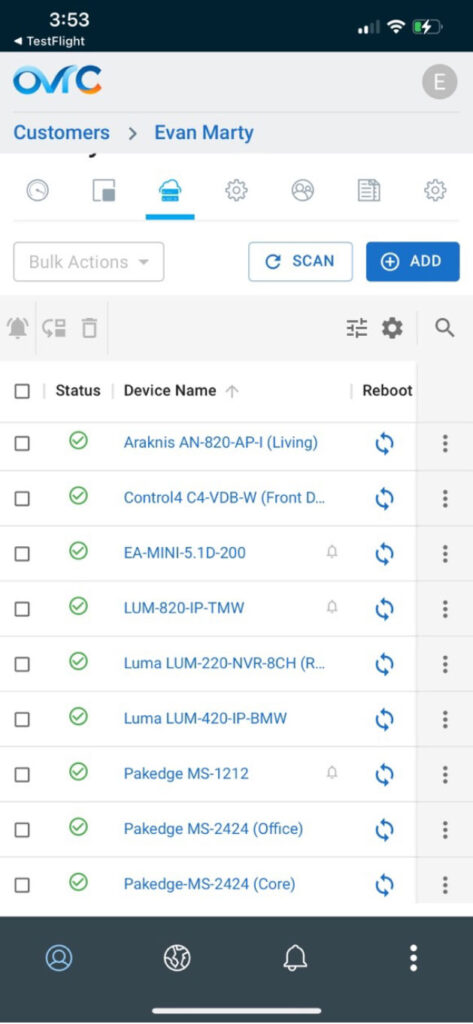
New Device List User Experience
We heard you loud and clear. When you’re in OvrC, you are there to get a job done- like finding a device and rebooting it. And you do this a LOT via mobile, where screen real estate is limited. This latest update features a redesigned Device List that more resembles the old one you loved, plus some notable improvements:
* Below is a screenshot of the latest device list on Mobile. As always we will continue to evolve, refine and improve the experience, and we welcome your feedback! Want to test drive new OvrC features before they are released? Sign up for our Beta program!
In case you missed the exciting updates since January- here’s a quick recap!
Network Health and Changes to Speed Tests
To truly understand network performance requires more than just internet speed tests. Earlier this year we released Network Health. This new feature adds latency testing for both Local Area Network (LAN) and Wide Area Network (WAN) to provide better visibility to the entire network. As noted in previous communications, with these added Network Health tools automated speed tests have now been reduced to once every 24 hours.
Network Health was introduced to provide better visibility into both internet performance and local network performance, while reducing potential impact to the customer’s network. Speed tests could negatively impact a customer network by overloading it and are not frequent enough to give you a good total picture. With the addition of WAN/LAN latency tests, we are able to run much more frequent tests without impact to the network.
Learn more about Network Health
OvrC Connect Changes and Bug Fixes
On February 3, we corrected known issues within the OvrC Connect app that were affecting customers’ ability to use certain portions of the OvrC Connect mobile application.
We have made some great updates to the OvrC platform in months. Here are a few highlights in case you missed them:
As always, we continue to evolve our product based on your feedback. Please provide your thoughts and ideas to [email protected]. Thank you!
With a redesigned exterior for rack installations, the new Sony ES Receivers make integration easier while still delivering superior performance. The AZ7000 and AZ5000 offer Sony's first 13.2 and 11.2 channel 8K receivers, respectively, with renowned Sony quality for music reproduction and video quality. Best in class connectivity allows for deep integration with OvrC and Control4 as well as other control systems. Check out the newest receivers from Sony, sure to make installation a breeze for you and provide your customers with a stately home theater experience.
Thanks to all our Partners who voted! Your support and confidence means the world to us here at Snap. We are honored to be recognized by our industry Partners who we strive to support every day across every area of our business. The selection of Snap One in so many categories validates our aspiration to always be improving, to be the very best Partner to our Partners.
Our primary goal is to support our Partners' businesses with the products, platforms, and support that they need to succeed. CE Pro's Quest for Quality Awards reinforce that the innovation and execution across our product lineup and other aspects of the Partner experience, like policies and tech support, are delivering the experiences our Partners require as they build their own businesses.
-- John Heyman, CEO of Snap One
Manufacturer Awards
Distributor Awards:
Unite outdoor audio and low-voltage lighting into one sleek, easy to install system. Durable IP66 certified, UV-protected components can be buried, mounted, or placed anywhere that suits your install.?Mix and match modular components to create the perfect solution for any space.
All-in-one outdoor solution
Bigger impact with less labor
360 degree of sound & light
Tool-free, Twist-To-Lock installation
Simple, single-wire install
Deliver space-filling sound and beautiful lighting with Episode Radiance.
Get an insiders view of all things Snap One with our newest series The Snap One Files! This 12-episode videocast series reveals what makes Snap One unique. We'll give you an exclusive look at our best-selling brands, showcase our partner stores, share our philosophy on quality, and much more.
New episodes will drop every Thursday through March 9, 2023.
Your local a Snap One Partner Store is now open in Florida! Allnet operates a fully-stocked warehouse offering most Snap One products commonly found on the Snap One Portal in addition to a huge selection of third-party brands including Sony, Samsung, Apple, Sonos, Klipsch, Lutron, Luxul, Eero, Ring, Yamaha, and more. See the full list of brands here.
Now, you can shop the industry's most popular brands in one place and enjoy hands-on training, in-person support, and design assistance. Get ready now to shop and pick up products at Allnet Fort Myers by filling out this quick authorization form, and a member of our team will reach out soon.
Doorbird offers the latest door station solutions for your single-family residential, multi-dwelling, or commercial job and anything in-between! Doorbird units can be surface or flush-mounted to match the aesthetics of your project. The durable back boxes are salt water and dust resistant to ensure the longevity of your installation. With multiple selections to choose from, there is a Doorbird product sure to fit your next project's demands.
As a reminder, new pricing was implemented on March 13th, 2023. The latest prices are reflected on the Snap One, Control4, Triad, and Pakedge portals, and in-location and online at all Snap One Partner Stores. To download the new price list, please see below.
Snap One Partners:
For Snap One price lists, click here or visit the Support tab on the Snap website.
Control4 Partners:
For Control4 price lists, click here or visit the Account page and use the Price List Export Tool on the Control4 portal.
Thank you for your Partnership.