
The new Luma 7MP PoE Floodlight Camera delivers professional-grade protection with powerful LED lighting and crystal-clear 7MP video — perfect for driveways, patios, and side yards.
With Power over Ethernet for reliable connectivity, this dual-lens camera captures a wide, detailed view and features Active Deterrence with audible alarms and light alerts. AI-enabled analytics detect people and vehicles with precision, while OvrC support simplifies remote management and updates. NDAA-compliant and easily installed using existing wiring, it’s built for smarter, safer home security.
Key Benefits:
Shop Ubiquiti Solutions
Scalable, high-performance IT is now within reach thanks to the addition of Ubiquiti to all our ADI | Snap One shopping channels. Powered by UniFi enterprise technology and UISP carrier platforms, Ubiquiti delivers:
Whether you’re managing a growing business or optimizing enterprise networks, Ubiquiti offers unified IT management and high-capacity internet access, all without the complexity or cost of traditional solutions.
Discover What’s New from Yealink
Yealink continues to set the standard for simple, powerful conferencing solutions. Known for delivering plug-and-play audio and video systems, Yealink makes it effortless to customize and manage meeting spaces of any size.
Now, we’re taking collaboration to the next level with Yealink’s all-in-one conferencing products designed for a streamlined user experience, high compatibility, and easy installation across diverse meeting scenarios. With embedded Microsoft Teams Room and Zoom Room certifications, Yealink ensures seamless connectivity and crystal-clear communication from virtually anywhere.
Whether you’re upgrading a huddle space or outfitting a large conference room, Yealink’s expanded portfolio gives you the tools to connect, collaborate, and innovate without limits.
We’re thrilled to welcome Vanco to our lineup. As a trusted name in the audio/video industry for over six decades, they are known for quality, reliability, and performance. Vanco engineers, manufactures, and rigorously tests every product in the U.S. to ensure the highest standards.
What Vanco Brings to Your Installations:
Whether you’re upgrading a home theater or outfitting a commercial retail space, Vanco delivers the tools to make your AV installations seamless and professional.
The new OvrC Wi-Fi QR Code Agent for Control4 lets users share guest Wi-Fi instantly. Scan the code on a Control4 Touchscreen or in the Control4 App to connect; no manual password entry required.
The QR code updates automatically when network credentials change, keeping access simple, secure, and fully automated.
Available now for OvrC-managed Araknis and Access Networks Unleashed Access Points, this feature adds convenience, privacy, and a modern touch to any Control4 project.
Key Features
To take advantage of this enhancement, ensure your projects are updated to the latest Control4 X4 version. This is just the start of more ways we’re growing the Control4 + networking ecosystem to bring added value and a more unified experience to every install.
Three convenient new features are coming to the Control4 X4 app this month: a weather widget, Wi-Fi code widget, and on-screen TV display for shades control. These features are designed to make smarter living possible for your customers. We’re sharing this in advance so you’re aware of what’s coming and can review the features with your team in case customers have questions.
The weather widget enables clients to view real-time, at-a-glance weather details, bringing local conditions directly into the app and helping homeowners make informed decisions.
The Wi-Fi code widget introduces effortless, secure internet for guest access. It eliminates the need for password sharing and offers a more secure way to connect to Wi-Fi using a QR code.
And the on-screen shade experience makes smart functions available on the biggest screen in the house. Homeowners will be able to control their shades from their TV screens, making everyday adjustments easier.
Weather Widget
This feature enables your clients to use a weather widget to view real-time weather details in their home location. It will be available on the mobile Control4 app.
How to Access the Weather Widget
Wi-Fi QR Code
Now, your clients’ guests can connect to Wi-Fi instantly by scanning a QR code. On both mobile and touch panel devices, your clients can add a Wi-Fi widget that displays the code. This feature eliminates the need for password sharing and offers a more secure way to connect.
How to Access the Wi-Fi QR Code
On-Screen Display (OSD) Shade Experience
A new feature that allows your customers to control their shades directly from their TV.
How to Enable the OSD Shade Experience
The new Self-Serve Mapping Tools in OvrC offer greater clarity and control over how Control4 accounts and projects map to OvrC locations. The tools, available in both the Account Management Dashboard and the Control & Automation category, allow you to identify and correct mapping issues on your own, using built-in guidance.
Problem
Mapping mismatches create obstacles with Dealer of Record changes, remote access and troubleshooting and OS upgrades, often requiring Support intervention to resolve.
Solution
The new Self-Serve Mapping Tools gives dealers visibility and self-serve tools to identify and fix mapping issues directly in OvrC, eliminating delays and reliance on Support for fixes.
Benefits
• Accurate mapping is essential to ensure systems are fully prepared for the upcoming X4 upgrades with optional Connect subscription in 2026.
• As Control4 and OvrC data experiences converge and rely on accurate mapping, this tool helps dealers future-proof their projects and avoid disruption when upgrading systems.
• Ultimately, this improvement can reduce friction in the service process, saving time and improving customer satisfaction.
Where to Find the Self-Serve Mapping Tools
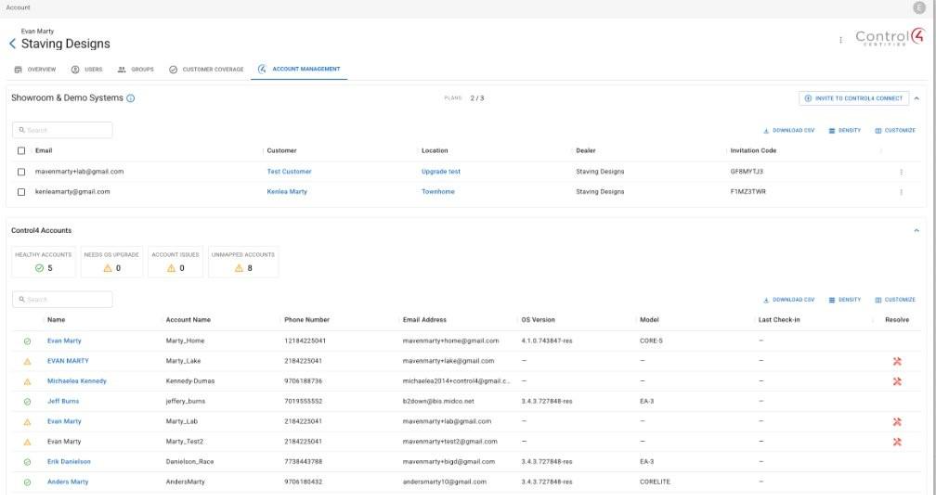
Find the Self-Serve Mapping Tools on the Control4 Account Management tab within the Account page in OvrC. This tab replaces the former Showroom & Demo Systems tab.
The Control4 Account Management tab now includes additional functionality, allowing dealers to view the mapping status of all Control4 customer accounts. If a mapping issue is detected, select Resolve to access the guided tools to fix the mapping directly in OvrC.
Note: The OvrC Account Owner can continue to view and manage Showroom & Demo Systems from within the Control4 Account Management tab.
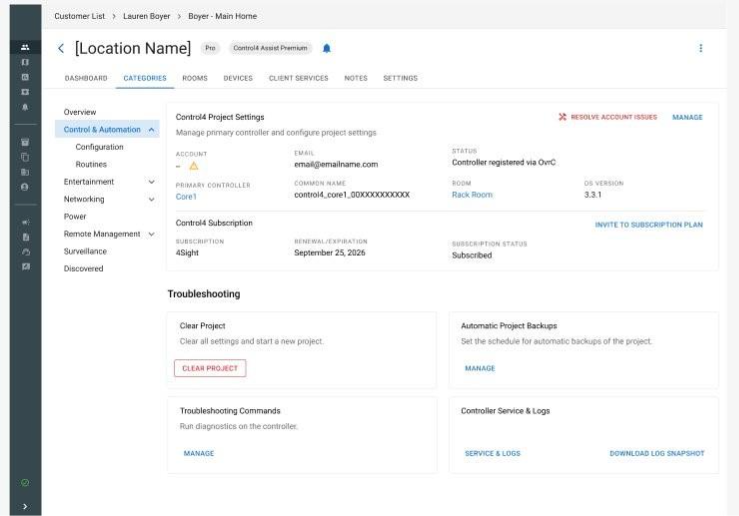
Dealers can also resolve mapping issues at the individual location level from the Control & Automation tab within a specific OvrC location.
For more information, search “Troubleshooting Control4 Connect registration issues” in Tech Community.
Visit Your OvrC Account Dashboard
Log in to OvrC today to use the Control4 Self-Serve Mapping Tools.
New Smart Wi-Fi Locks from Kwikset
Discover enhanced convenience with the new Kwikset Halo smart locks, now available at ADI | Snap One. These locks connect directly to your Wi-Fi, without the need for a hub, and allows users to manage access from anywhere using the Kwikset app. Enjoy features such as 250 customizable access codes, one-touch locking, SmartKey Security, and a BHMA Grade AAA certification. They’re easy to install and are designed to provide users with peace of mind.
Shop First Alert CX4 Today
First Alert CX4 Cameras, their most advanced camera series yet, are now available at ADI | Snap One. With 4K ultra-high-definition video, intelligent analytics, and seamless integration with ProSeries and VISTA Hybrid Security Systems, these cameras deliver trusted performance for homes and businesses.
Key Features:
Upgrade your security with First Alert CX4, available now through Snap One.
eero PoE 7 brings Wi-Fi 7 performance to the next generation of connected homes and businesses. Designed for professional installations, this low-profile powerhouse mounts seamlessly on walls or ceilings while delivering multi-gig speeds across hundreds of devices. With tri-band Wi-Fi and PoE flexibility, integrators can eliminate dead zones and ensure smooth, reliable connectivity for data-heavy workflows, video conferencing, and smart home systems. Built for scalability and speed, eero PoE 7 is the ultimate solution for clients who demand high-performance networking without compromise.