
Bridge Mode is now available on Araknis Networks X20 Wi-Fi 6 Access Points, extending a popular capability from the X30 Wi‑Fi 7 platform across the Araknis Networks wireless portfolio for indoor and outdoor applications. With a simple firmware upgrade and configuration in OvrC, dealers can wirelessly connect remote locations and devices without running additional cable—ideal for hard-to-reach indoor areas or outdoor structures like detached garages and boathouses.
Why Bridge Mode?
Access Networks Unleashed C670 expands the Wi-Fi 7 portfolio with a purpose-built wall-mount access point designed for environments where ceiling mounting is not ideal or preferred. Combining tri-band Wi-Fi 7 performance with integrated multi-Gig Ethernet ports and PoE output, the C670 delivers both high-performance wireless and wired connectivity, creating a convenient connectivity hub.
Key Features:
• Tri-band Wi-Fi 7 Unleashed performance
• 5GbE uplink with four 2.5GbE ports for high-speed wired connectivity
• Integrated switching and PoE output for powering in-room devices
• BeamFlex+ adaptive antenna technology
• OvrC remote setup, monitoring, and troubleshooting support
The Araknis 830 Wi-Fi 7 Access Point delivers premium, professional-grade performance for demanding residential and light commercial installs. With a tri-band 4x4 design that supports higher throughput and more connected devices without congestion, it’s built for consistent performance under load, and the 10G Uplink prevents bottlenecks ensuring reliable, Wi-Fi 7 across every project.
Key Features:
Explore the latest resources designed to help you sell, deploy, and manage Wi-Fi 7 with confidence. Watch the new overview and product videos, build your skills with Smart Tools training in OvrC, and discover how features like Wi-Fi Optimization, Proximity View, and Bridge Mode can help simplify deployments and improve network performance. Plus, shop the new Araknis 530 Wi-Fi 7 Indoor Access Point and explore additional tools and resources to support every install.
Not much compares to the beauty of spring and summer, except how beautifully our outdoor solutions help you create the ideal outdoor space for your customers. Explore our expansive portfolio of outdoor solutions to help you make the outdoors outstanding for your customers.
With the new eero Signal you can add cellular backup to your customers’ networks.
It easily installs with compatible eero devices and turns on automatically if the primary network drops, then turns off when service returns. The multicellular eSIM enables Signal to connect to the best available network for your location, ensuring a hassle-free setup and reliable performance when needed.
Product requires an annual eero Plus subscription, available for purchase in the eero app, to keep your customers connected.
Managing third-party devices with OvrC Pro is now more straightforward and secure, thanks to our latest update. With these enhancements, OvrC Pro supports SNMP v3 and streamlines the configurations of SNMP v1 and V2 communities. Here’s what you need to know about these updates and how they benefit your business:
What is SNMP?
SNMP (Simple Network Management Protocol) is a standard protocol used to monitor and manage devices on a network; think routers, switches, wireless access points, printers, and more. By configuring SNMP, OvrC Pro can gather richer data from your devices, making troubleshooting more accurate and providing a clearer picture of your entire network.
For those less familiar with networking, it helps to know that OvrC has always supported SNMP v1 and v2. However, setting them up was tricky, and the data sent over the network wasn’t encrypted. That’s where SNMP v3 comes in: it introduces encryption and lets you use unique usernames and passwords for each device, making your network more secure.
Key Enhancements
SNMP v3 Support
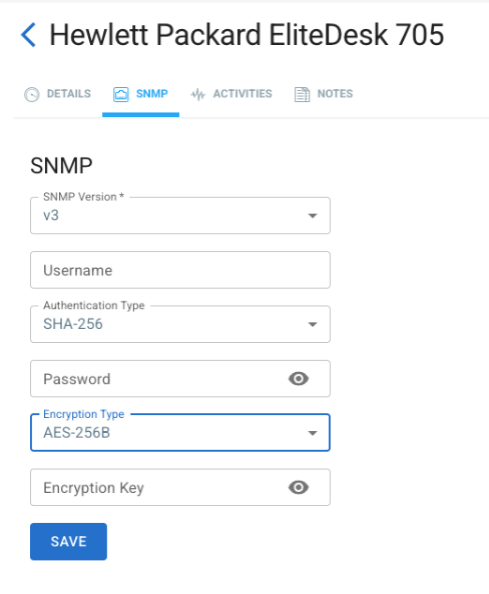
Configurable Credentials for SNMP v1 and v2
Additional Agent Improvements
Supported Brands
OvrC Pro offers powerful integration with SNMP-enabled devices from your favorite brands available at ADI:
Why These Enhancements Matter
Ready to Get Started?
The Araknis 530 Wi-Fi 7 Indoor Access Point delivers faster speeds, lower latency, and tri-band 2x2 performance for residential and small-to-medium business installs. New smart tools like Wi-Fi Optimization, Proximity View, and Bridge Mode reduce install time and eliminate manual tuning. With full backward compatibility, integrators can mix Wi-Fi 6 and Wi-Fi 7 access points in the same project without having to replace every existing AP.
Key Benefits:
*Bridge Mode coming soon for Wi-Fi 6 Series.
Shop Ubiquiti Solutions
Scalable, high-performance IT is now within reach thanks to the addition of Ubiquiti to all our ADI | Snap One shopping channels. Powered by UniFi enterprise technology and UISP carrier platforms, Ubiquiti delivers:
Whether you’re managing a growing business or optimizing enterprise networks, Ubiquiti offers unified IT management and high-capacity internet access, all without the complexity or cost of traditional solutions.
eero PoE 7 brings Wi-Fi 7 performance to the next generation of connected homes and businesses. Designed for professional installations, this low-profile powerhouse mounts seamlessly on walls or ceilings while delivering multi-gig speeds across hundreds of devices. With tri-band Wi-Fi and PoE flexibility, integrators can eliminate dead zones and ensure smooth, reliable connectivity for data-heavy workflows, video conferencing, and smart home systems. Built for scalability and speed, eero PoE 7 is the ultimate solution for clients who demand high-performance networking without compromise.
Backup and Restore is a smarter, more scalable way to manage your OvrC configurations for Araknis wired devices. Save your preferred settings, convert them into templates for future projects, and apply them to identical models in just a few clicks. Deliver faster, more consistent setups at scale, protect your configurations, and give your team peace of mind.
This feature supports Araknis Networks 220, 320, 420, and 620 switches (excluding the 920 series) as well as 220 and 520 routers.
This guide will help you:
Note: Update your switch firmware to 1.1.13.00 or later to access these features in OvrC.
Backups are created from a device’s Configuration page, which includes a new line item called “Backup and Restore”.
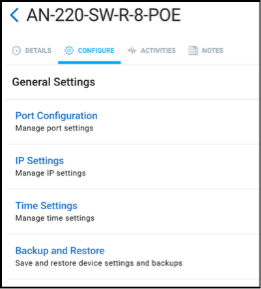
They’re created with a single button press and assigned an auto-generated name, which you can later change using the three-dot menu to the far right of the grid that displays the relevant backups.
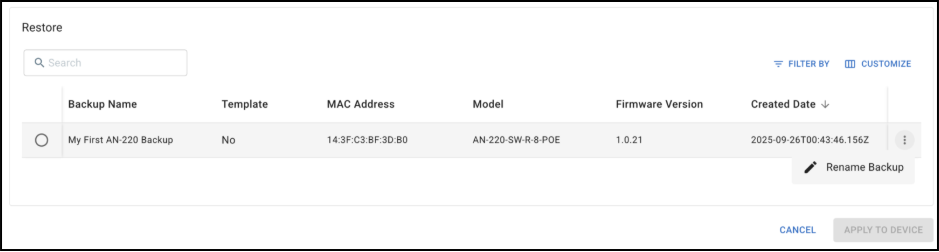
Note: All backups compatible with the relevant Araknis routers and switches will appear here, with the MAC address of the originating device listed (along with the name) to help distinguish them.
This is also where you’ll see any templates on your account that are compatible with this device, and where you can select a backup and designate it as a template.
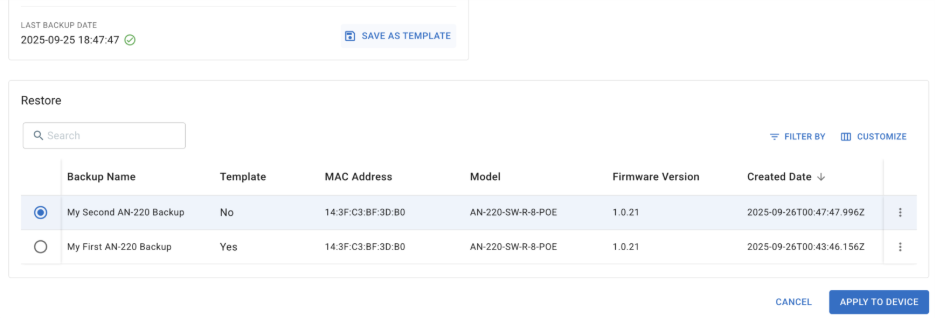
Once a backup or template is selected, you can choose “Apply to Device”. This will trigger a device reboot while the configuration file is applied.
You can restore (i.e., apply) a backup or template to an individual switch or router from that device’s Configuration → Backup and Restore page. This is a quick way to revert unwanted changes or apply a configuration from another similar Araknis wired device to a new one you’ve added to the location. If there are compatible backups at this location or compatible templates in your dealer account, you’ll see them and can apply them from the Configuration → Backup and Restore page.
For larger projects, take advantage of our Bulk Actions functionality. Navigate to Categories → Networking.
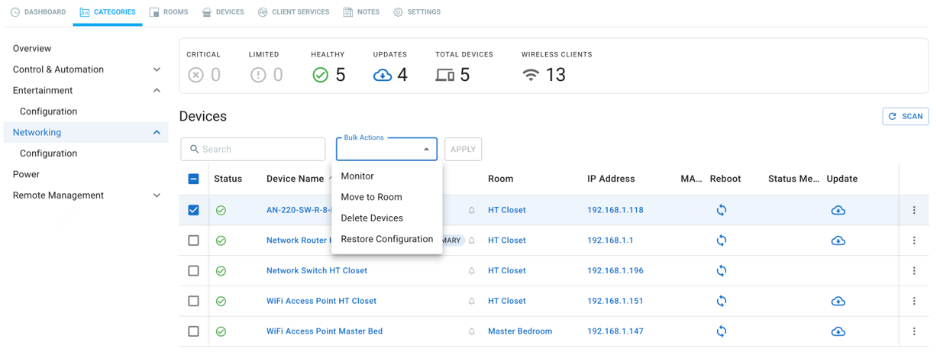
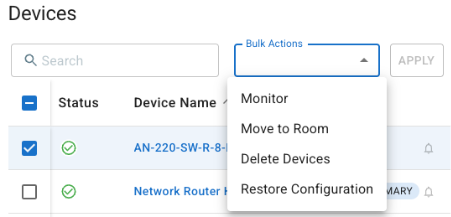
Once you select one or more devices in this list, a Bulk Actions dropdown will appear, allowing you to choose “Restore Configuration.”
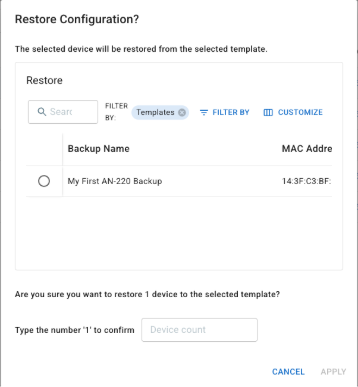
Selecting “Restore from Template” and clicking “Apply” opens a dialog where you can choose which backup or template to apply to the selected devices. Use the Filter By options and the nearby buttons labeled “Templates X” or “Backups X” to toggle between viewing backups, templates, or both.
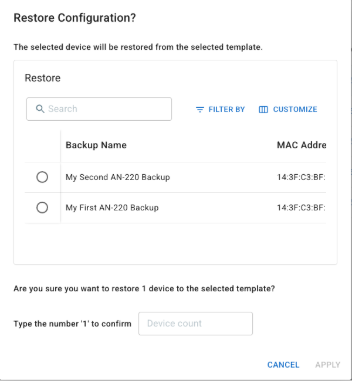
Selecting a file allows you to confirm and apply it. This sends the file to the switch or router and triggers a reboot to apply the new configuration.
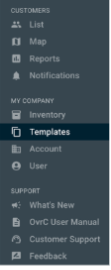
Finally, there’s a new Templates icon on the left side of the OvrC screen, located in the MY COMPANY section. This is where you can view all the templates saved in your dealer account, sortable by model, searchable, and more.
Currently, you are limited to five templates per device model, so we recommend using them for your most common “base configurations,” which you can then customize for each new site.
If you want to reuse a backup from one location at another, simply go to Location A, convert the backup into a template, apply it at Location B, and then unmark it as a template when you’re done.
There are privacy rules governing access to templates and backups when customer accounts are shared between dealers:
Watch the Smart Skill Video Below
Step into the future of networking with the flagship Araknis 10G 920 Series Switch and the compatible 100G QSFP28 Expansion Module.
The 920-Series L3 Managed 10G PoE++ Switch is designed for the most demanding AV over IP applications or for those seeking the latest in high-speed performance. With 10G available on every port and 90W per port, this switch is perfectly suited for applications like Binary MoIP, Wi-Fi 6, and >1G ISP services.
When speed matters most, push every project to the limit with the 100G QSFP28 Expansion Module. This module easily installs into the Araknis 920 Switch, supporting uplink speeds of up to 100G for seamless, high-performance networking. This is ideal for any commercial project or high-bandwidth residential system.
Unlock up to 75% off the Araknis 920 Switch and single-port expansion module today.
*Offer valid while supplies last. Discount cannot be combined with other offers. ADI | Snap One reserves the right, in its sole discretion, to modify, extend, or terminate the program at any time. Void where prohibited.
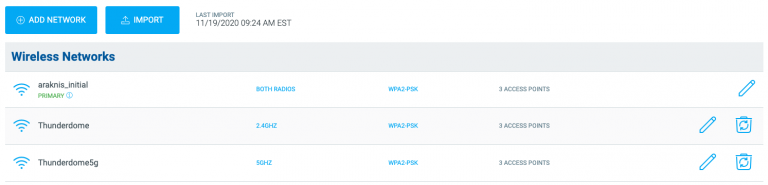
This update includes improvements to Wi-Fi Management and several small bug fixes. The updated web application is available now. Updates to the mobile are waiting on final approval from Android and Apple. Please stay on the lookout for notifications prompted on your mobile device to update your OvrC app.
As always, we continue to evolve our product based on your feedback. Please continue to provide your thoughts and ideas to [email protected] or through the user feedback section of the web and mobile applications. Thanks!
Cool off this summer with our new Araknis features, and let OvrC do the work for you!
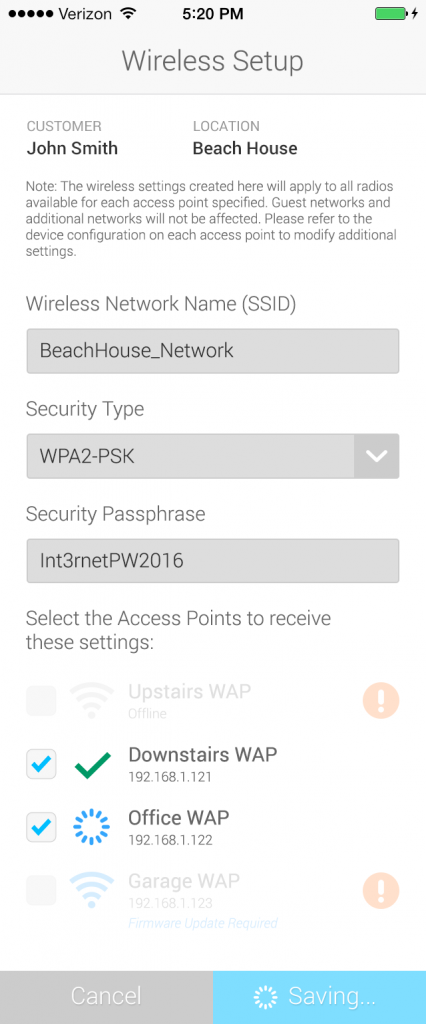
We’ve heard from a number of you that setting up a network at a new job site can be cumbersome. We’ve streamlined the process so that you can create a wireless network across multiple Araknis access points with the click of a button on desktop or mobile. Just enter a network name, security type, and password, and you’re good to go!
Note: This is for first time setup and using this feature to edit an existing network is not recommended.
We’re always looking for feedback, and we’d love to hear from you. Send your thoughts and suggestions to [email protected].
Just in time for CEDIA, we have several exciting improvements on the OvrC Platform.
OvrC Pro 7.0.0
With the release of OvrC Pro application v7.0.0 we have added third-party support for select models of Sony AVRs, soundbars, and line array speakers. Now, when Sony products are paired with an OvrC Pro agent host device (Araknis/Pakedge routers, Control4 controllers, or the OvrC Pro Hub) technicians will have extended information available through OvrC for advanced troubleshooting. New capabilities for the Sony products include:
For more advanced configuration, the local web UI of the device can be accessed remotely using the OvrC WebConnect feature.
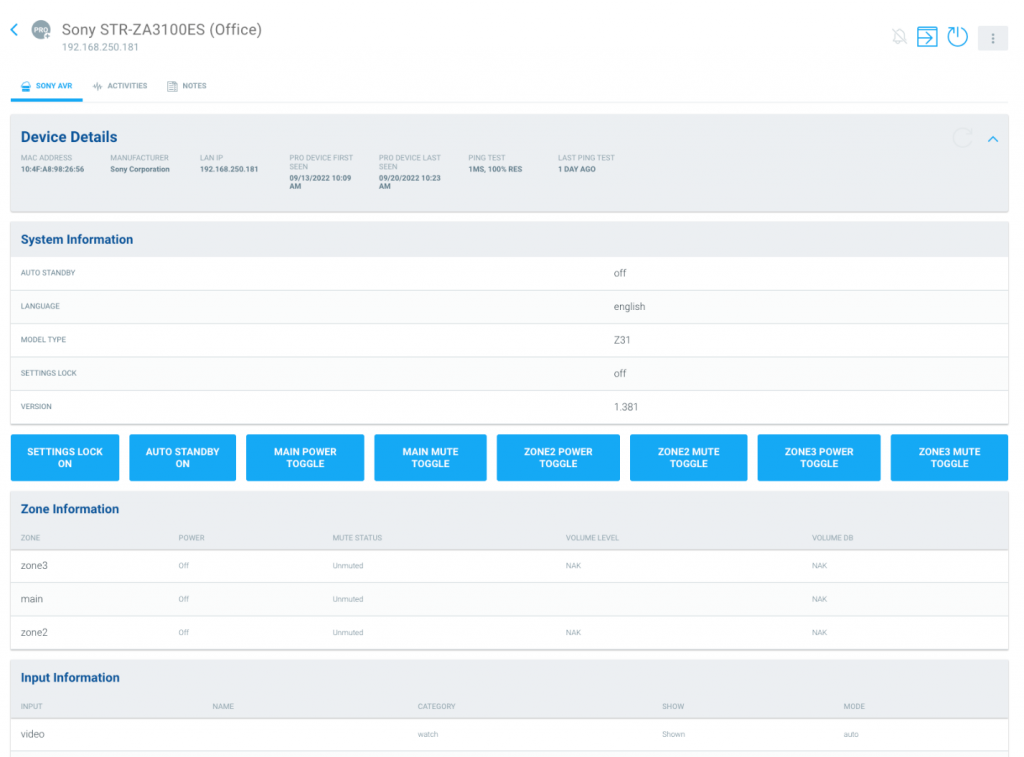
Additionally, there are improvements made to identifying Sony Bravia TVs that are wirelessly connected to the network so that the existing third-party integration on supported models properly show up in OvrC as Sony devices.
OvrC App Version 2.37.0
With the release of the OvrC web app version 2.37.0, we have made improvements to the OvrC mobile and desktop experiences including an improved process for adding new locations, and automatic transfer of OvrC-discovered third-party products to the location where they were last scanned.
Adding a new location
There are several improvements when adding a new location in OvrC. First, when adding a new customer, there can only be a single location added at that time. If additional locations are needed for a specific customer, new locations can be added by clicking on the “3-dots” on the right-side of the customer row. From there you can edit customer information, edit location information, or add a new location.

We have added Address Line 2 as a field without impacting the Google verified address or how the pin appears on the map in OvrC. Also, when the address is selected, it’s broken out into separate fields for address 1, address 2, city, state or province, and postal code instead of a single line of text containing all fields.
Discovery and Transfer of Third-Party Devices
Based on feedback from our Partners, we have improved how we handle discovery of third party devices. Often, these discovered devices like mobile phones, tablets or laptop computers will physically move from one OvrC Pro location to another – for example, when your technician’s laptop was discovered on one job, then that technician goes on-site to another OvrC job. This has created confusion in falsely reporting that a device is connected to the network when it’s not physically in the system, or caused issues with trying to discover a device that was already claimed in a different location and not being able to get the device to show in its correct location.
OvrC now allows for the automatic transfer of third-party devices to the location where they were most recently scanned by an OvrC Pro agent. To transfer OvrC-enabled devices, eg. Wattbox, from one project to another still requires a manual transfer. If the locations are still within the same Partner account, this can be done directly within your OvrC account. If the original and new customer locations are tied to different OvrC accounts, then they must be transferred using the Take Over Process Learn More.
As always, we continue to evolve our product based on your feedback. Please continue to provide your thoughts and ideas to [email protected] or through the user feedback section of the web and mobile applications. Thanks!
The all-new Xstream architecture delivers extreme levels of protection, performance, and visibility.
PROTECTION
Sophos XGS offers the best protection against the latest advanced threats like ransomware, bots, worms, hacks, breaches, and APTs with unique and innovative technology designed to catch threats we haven’t even seen yet.
PERFORMANCE & SPEED
Sophos XGS delivers industry leading performance and price-per-protected Mbps that ensures you can fully engage all the latest next-gen protection technology without compromising on performance.
VISIBILITY
Sophos XGS provides visibility into what’s really happening on your network. The firewall removes an enormous blind spot, providing extreme visibility and insight into all your network traffic whether it’s encrypted, evasive, or elusive.
These Sophos XGS features and more are available as a part of Access Networks custom Core Systems. To learn more about the value of Core Systems and the specific benefits and features of Sophos XGS Firewalls, contact the Access Networks team at [email protected]
Sophos XGS Firewalls are also available separately as an unmanaged product. Training is required prior to purchase.
To learn more about Access Networks’ services and solutions and/or to become an Access Networks Authorized Dealer, please visit our website: https://www.accessnetworks.com/connect-with-us/contact-us/
Give your clients a reliable signal and fast internet speed anywhere outdoors with the new Araknis AN-520 Outdoor Wireless Access Point. The AN-520 brings the latest in Wi-Fi technology to the Araknis lineup! Wi-Fi 6 offers support for OFDMA, MU-MIMO, 1024 QAM, 160MHz Channel Bandwidth, and BSS Coloring to help support higher network capacity and enhanced reliability. The AN-520 features a 2x2 antenna design supporting peak data rates of up to 3,000Mbps at 160MHz Channel bandwidth and a 2.5Gbps LAN port-in to offer support for multi-gig jobs. Its built-in, two-port Switch with an option to provide PoE-out (15W) when powered by 802.3bt (60W) offers quick and easy connectivity to an adjacent device, such as IP Camera or IoT device.
Meet the compact Access Networks A370 Indoor Access Point—our new enterprise-grade, dual-band Wi-Fi 7 solution built for low- to medium-density environments. With lower latency, faster speeds, and more consistent performance than Wi-Fi 6, the A370 was designed to deliver next-gen connectivity in a sleek, low-profile design that blends seamlessly into premium spaces.
Backed by a limited lifetime warranty, expert support, and full OvrC cloud-managed control for remote configuration, monitoring, and troubleshooting, the A370 empowers installers to provide dependable, enterprise-grade Wi-Fi 7 to smaller commercial venues and homes. Give your customers the high-performance connectivity they expect with an access point that's purpose-built for premium small spaces.
The Araknis® Networks 920 Switch sees enhanced functionality to be used as a Media over Internet Protocol (MoIP) installation thanks to OvrC®. With the added Configure MoIP System button now in OvrC, you can more efficiently set up the system, configure settings, and move the customer’s content. When pressed, the button properly configures settings such as IGMP settings to pass multicast traffic, and even optimizes other complex settings and data traffic loads. This ensures every project offers the best performance and network efficiency while saving time on every installation.
Say goodbye to third-party transceivers and hello to Araknis® -branded modules! These new transceiver modules are specially designed and tested to seamlessly integrate with Araknis Network switches, ensuring optimal performance and reliability for your projects.
With support for SFP, SFP+, and QSFP28 connection types, Araknis-branded modules allow for ethernet, fiber optic, and direct attach cable (DAC) connections in a single network. Whether you need high-speed data transfers, long-range connectivity, or both, these transceivers have you covered.
Featuring a robust metallic form factor, each module offers protection against electromagnetic interference and efficient heat management, ensuring stability and durability in any environment.
Upgrade your network installations with Araknis-branded transceiver modules today and experience the unmatched performance, reliability, and ease of installation you’ve been looking for.
Access Networks switches are designed for tough network environments that require peak performance and capabilities. With advanced Layer 3 functionality, enterprise-grade components, and sophisticated network traffic management, these switches ensure optimal performance where milliseconds of latency matter.
February 1, 2024 – Changes to claiming the OvrC Pro Hub
As we work to make your customer homes more secure and make efficient use of your time, we have made an improvement based on feedback from our Partners.
OVRC PRO HUBS WILL NOW NEED TO BE MANUALLY CLAIMED
The release of the OvrC Pro app version 7.4.0 brought the elimination of the local UI on the OvrC Pro Agents (Araknis/Pakedge routers, Control4 controllers, and OvrC Pro Hubs). As a result, we have heard feedback through our support channel that this is making system takeovers more difficult as the OvrC Pro Hub, including legacy Pakedge NK-1 and supported Ihiji devices, is automatically claimed by a scan before the technician can claim the device to their account.
To resolve this issue, the OvrC Pro Hub device will no longer be claimed when found in a network scan, and instead will have to be manually claimed to the location. This change does not impact any Araknis/Pakedge router or Control4 controllers. Those will continue to be claimed through a network scan or manually without any change.
Learn how to move a customer’s existing OvrC devices to your OvrC account in this post in the Tech Community.

RECOMMENDED BEST PRACTICES
In situations where a Partner is taking over an OvrC location from a different Partner, Snap One recommends the following as best practices:
As always, we continue to evolve our product based on your feedback. Please continue to provide your thoughts and ideas to [email protected] or through the user feedback section of the web and mobile applications. Thanks!
The New Araknis 420 Series switches are a great mid-range solution, bridging the gap between the 320 and 620 Series with multi-gig capabilities, 10Gbps uplinks, lite Layer 3 functionality, and more. Additionally, we are excited to announce the new 44-port 220 Series switch addition.
Key Features:
Versatile Port Options: Offers 16 to 48 ports in both front and rear configurations
Familiar Setup and Management: Enjoy the same easy setup and management process with full OvrC® support
Lite Layer 3 Functionality: Enhance your network with advanced routing capabilities
Enhanced Cooling and Noise Reduction: Redesigned fans provide greater cooling efficiency and noise cancellation
5-Year Warranty: Covers parts and labor for defects in material or workmanship under normal use
Snap One™ is excited to announce that UltraTech’s cutting-edge network switches are now part of our product lineup! Designed to deliver exceptional performance and reliability, UltraTech is your go-to solution for seamless data transfer in video surveillance, alarm systems, access control applications, and connected devices.
Key features of the UltraTech series:
Whether you’re building a robust home AV network, upgrading security systems, or enhancing device connectivity, UltraTech provides a solid foundation you can trust.
Managing firmware updates across multiple access points just got a whole lot easier.
With the new Bulk Firmware Update feature in OvrC’s Wi-Fi Management tool, you can update all your Araknis Wi-Fi 6 APs simultaneously, right from your browser. This saves time during installs and makes managing larger jobs much more efficient.
The Bulk Firmware Update feature, found under Wi-Fi Management in OvrC, makes it faster to commission and deploy Araknis Wi-Fi 6 APs by allowing you to push firmware updates to multiple devices simultaneously. No more updating APs one at a time.
Supported Models:
FAQs
Q: Will this work with older Araknis models?
A: No. The Bulk Firmware Update feature supports Wi-Fi 6 access points only.
Q: Is this feature already live?
A: Yes. The Bulk Firmware Update feature is live now in your OvrC Wi-Fi Management tool.
If you’re installing multiple APs or refreshing firmware, here’s how to take advantage of this new feature in the OvrC Wi-Fi Management tool.

Navigation & Setup
The Bulk Firmware Update blue hyperlink button will only appear if there are updates available. If APs have already been updated the blue hyperlink button will no longer be visible.
Here’s what your Wi-Fi Management tool will look like if firmware updates are available to install:

Once in OvrC Wi-Fi Management:
Remember, the Bulk Firmware Update blue hyperlink button will only appear if there are updates available. If APs are updated already, the blue hyperlink button will not be visible.
We are constantly enhancing OvrC to make your job easier. This is just one example of how we’re streamlining setup and support to save you time and simplify every install.
Stay tuned for additional product lines that will gain Bulk Firmware Update support.
Get Increased Network Coverage with Wi-Fi 320 Series AP
Get the Araknis AN-320 Wi-Fi 6 Indoor Wireless Access Point for only $110, plus earn Partner Rewards points on every purchase. Now through June 30, 2025, authorized Snap One Partners can take advantage of this exclusive offer.* With Wi-Fi 6 technology and speeds up to 1800Mbps, the Araknis 320 Series provides a solid network foundation for single-family homes, apartments, and small businesses. Thanks to OvrC remote management, the Araknis 320 Series Access point is easy to configure, update, and reboot.
*Terms and conditions
*This offer expires June 30, 2025. Promotion is limited to Araknis AN-320 Wi-Fi 6 Wireless Access Point AN-320-AP-I |V6-AN320API only. No limit to the number of orders. Discount cannot be retroactively applied to orders previously placed or combined with any other offers. Must be redeemed at snapav.com, ADIglobaldistribuion.us, or in store. Snap One reserves the right, in its sole discretion, to modify, extend, or terminate the program at any time. Void where prohibited.
The new eero 7 Mesh Wi-Fi Routers provide reliable, high-capacity connectivity for all your smart home needs. They can cover up to 2,000 sq. ft. and support up to 120+ devices. The Dual-Band model supports internet plans up to 2.5 Gbps, two auto-sensing 2.5 GbE ports, and wireless speeds up to 1.8 Gbps, ensuring full-speed performance for streaming, gaming, video calls, and more. While the Tri-Band supports internet plans up to 5 Gbps, two auto-sensing 5 GbE ports, and wireless speeds up to 3.9 Gbps, it delivers pro-level performance.
We are excited to announce the latest update to our Araknis X20 series switches in OvrC. This update is designed to enhance your experience in managing your network and connected devices. You can access this new feature as soon as you log in to OvrC.
Here Are Some Highlights of the New Feature Set:
Revamped switch details tab: Access more relevant information, including names of connected devices for each port, MAC addresses, power usage, and more!
Automatic device detection: Araknis X20 series switches will now automatically recognize devices connected to each port, displaying their names in OvrC.
Time-saving efficiency: Reduces the need for manual assignment of device names, allowing you to quickly identify device status and access additional pertinent information.
This update is available for Araknis Networks 220, 320, 420, 620, and 920 series switches. We hope these improvements will make managing your network easier and more efficient.
The brand new eero Outdoor Access Point is built to withstand just about any condition with its IP66 rating, while the eero TrueMesh software allows you to easily set up for optimized speeds. The same eero connectivity customers rely on for indoor access is now available outdoors as well.
With the ability to support 100 or more devices the new eero Outdoor Wi-Fi 7 Access Point helps create the ultimate outdoor entertainment escape. Users can experience wireless speeds of up to 2.1 Gbps while enjoying their patios, pools, treehouses, and yards thanks to its coverage capabilities of up to 15,000 sq ft.
With standard power and Power over Ethernet options available you can find the right access point for your installation.
Araknis Networks Expansion Module
Introducing a new 4-port 25/10G Expansion Module for Araknis 920 Series switches. Designed for use with the Araknis 920 Series switch, these expansion modules allow the expansion of the network to additional switches, creating high-speed uplinks that fully utilize the switches' full backplane speeds up to an incredible 100G or 25G/10G.
Important update: Access Networks is extending its warranty for Unleashed Wi-Fi 6 Indoor Access Points and Switches, offering a Limited Lifetime Support and Warranty. This new policy not only applies to new purchases but also retroactively covers previously purchased hardware, ensuring long-term protection and peace of mind for all our customers.
Whether you're installing new systems or upgrading existing networks, this warranty extension reflects our commitment to delivering reliable, top-quality solutions for your business or home. Stay connected, supported, and secure with Access Networks.
Designed for large systems that can't afford to experience a moment of downtime, the MXnet 1G Control Box helps keep the network operating 24/7. An RJ45, RS-232 communication interface monitors "heartbeat" signals from the control box, while pre-installed Virtual Router Redundancy Protocol software facilitates the failover process. The Standby box assumes the active IP address if a temporary or permanent event occurs to the Main CBOX. Acting as the system control component for the MXnet 1G ecosystem, this control box is responsible for setup, control, diagnostics, troubleshooting, and endpoint updating.
Araknis Networks X20 Series Managed Switches now feature a 5-Year Limited Warranty. This covers parts and labor for components found to be defective due to materials or workmanship under normal use. Products that have been abused, modified, or disassembled are not eligible for warranty coverage. For repairs, products must be sent to Snap One or an authorized service center with an assigned return authorization number (RA).
Introducing the Araknis AN-320 Entry-Level Wireless Access Point! Great for smaller projects, single-family homes, and apartments, this Wi-Fi 6 device supports OFDMA, MU-MIMO, and more for enhanced network capacity and reliability. With a 2x2 antenna design and peak data rates of up to 1800Mbps, make it your go-to solution for lightning-fast connectivity.
This spring, explore outstanding outdoor solutions that delight customers and help make your jobs easier. Unite outdoor audio and lighting with easy-to-install Episode Radiance audio solutions or make entertainment shine in the sun with SunBrite TVs. Regardless of the outdoor space, the extensive lineup of Snap One outdoor solutions can help your clients enjoy the warm weather and assist in growing your business.
Expand your customers network with Araknis access points allowing them to experience seamless browsing and streaming, regardless of whether they are inside or outside. Enjoying amazing audio doesn't have to be restricted to indoor spaces. Outdoor audio with Episode landscape speakers delivers full, robust sound while blending into the environment. Constructed with all-weather components, Episode landscape speakers deliver remarkable sound in every climate. Round out your outdoor projects and streamline your customers surveillance with Luma and its easy-to-install, high-quality solutions with multiple, attractive end-user features.
Exciting news for our Partners! Introducing Araknis In-Ceiling Brackets, a cost-effective solution for mounting Araknis Wi-F Indoor Access Points. Featuring patented Push Lock technology, simple seamless installation directly into ceiling drywall allows these brackets to maintain a sleek aesthetic. Plus, they share the same cutout dimensions as Episode In-Ceiling Speakers, allowing for flexibility and consistency no matter if it's an access point or an architectural speaker.
Over the next few months, the Araknis 210 and 310 series switches will be replaced with the 220 and 320 series. The new 220 and 320 switches will be priced the same as the 210 and 310 while offering the same performance with the addition of enhanced memory for expanded OvrC capabilities. The 220 and 320 series feature 1Gbps speed across all ports allowing for powerful connectivity, while a new user-friendly GUI and multiple mounting options ensure a quick and easy install.
Win more projects with reduced pricing on select networking solutions from Araknis and Access Networks! We are confident these price reductions will enable you to win more projects � and remember that every dollar you spend on these products qualifies for 3X points in the Partner rewards program.
We've added new multi-gig routers and switches to the Araknis product line. This new lineup of multi-gig solutions along with our Wi-Fi 6 wireless access points, allows you to deliver a reliable and scalable network needed for high-bandwidth, client-dense installations.
New Multi-Gig Switches are OvrC Enabled
Manage and support high-bandwidth installs with new Araknis 920 and 620 series switches. The 920 series features full Layer 3 and Layer 2 functionality, 10G PoE++ Type 4 ports to provide up to 90W of power per port, and multicast routing making it perfect for high-speed applications. The 620 series fully supports bandwidth requirements for Wi-Fi 6 with 2.5G throughput and PoE ++ Type 3 ports.
With OvrCn enabled on every Araknis switch, you can name, configure, and control each individual port on a PoE-capable switch. Plus, you can get detailed stats per port, including switch connection status, link speed, power consumption, and data sent and received all without rolling a truck.
New Multi-Gig Routers with OvrC Pro
Install Araknis Networks 520 and 220 series routers featuring multi-Gigabit LAN and WAN interfaces for demanding high bandwidth installs. The 520 series offers a dual-WAN connection for load-balancing and link failover. The 220 series comes in a compact form factor to fit racks, wiring cans, walls, and tabletops.
Every Araknis router includes OvrC Pro which extends your visibility and access to the entire network of IP devices, including non-Snap One products, all within the same OvrC platform. You get access to enhanced system health, troubleshooting capabilities, and diagnostic data that makes remote network support easy, eliminating unnecessary truck rolls and enabling you to provide world-class service to your clients.
The Latest Wi-Fi 6 Access Points with OvrC
The 820 series and 520 series wireless access points offer the latest in Wi-Fi technology to the Snap One™ networking lineup. The 820 series wireless access point offers lightning-fast speeds with Wi-Fi 6 and a 2.5Gbps LAN port-in with the option for a more customizable configuration while the 520 series outdoor AP features a 2x2 antenna design and a 2.5Gbps LAN port-in to offer support for multi-gig jobs.
With OvrC, you can discover and configure all connected APs from a single dashboard and push SSID, roaming, and radio settings simultaneously to eliminate hours of manual setup time. See which clients are connected, monitor throughput, get details into devices that have fallen offline, and view upload and download history. Learn More
Access Networks is now a part of the Partner Rewards program! When you shop Access Networks, you'll now earn three points for every dollar spent, contributing toward your total points within the Partner Rewards program.
Combine the safety and security of iPORT Connect Pro cases and stations with the new PoE Adapter to ensure the iPad is charged and connected to a hardwired network. Through this connectivity, customers get dedicated network speeds for their device. The ability to be added to the BaseStation or the WallStation provides installation flexibility for integrators. Shop the new PoE Adapter and the entire iPORT Connect Pro ecosystem to unleash the power of iPad for complete smart home control.
Featuring wired speeds of up to 9.4 Gbps, customers can stream music, watch videos, play games, and make video calls with minimal loading times. The new PoE 6 Gateway even offers eight PoE-capable ports to power multiple PoE 6 Access Points, giving optimal Wi-Fi coverage to end users. With a built-in Zigbee smart home hub, customers can control certain Alexa products as well. When you install the eero PoE 6 Gateway combined with eero's new PoE 6 Access Point, you give your customers the power of Wi-Fi 6 as well as easier set-up, system monitoring and updates, and remote management. The good news for you is that you'll roll even fewer trucks, and they'll have faster service.
Take on the most demanding of network installs with the new Araknis Networks 520 and 220 series routers. Both feature a multi-Gigabit LAN and WAN interface for high bandwidth installs. The 520 series has a dual WAN connection for load-balancing and link failover while the 220 series offers single WAN and a compact form factor to fit racks, wiring cans, walls, or tabletops. Every Araknis router is embedded with OvrC Pro to extend your visibility and access to the entire network of IP devices.
The B350 Wi-Fi 6 omni-directional outdoor Unleashed access point is now available on the Snap One Dealer Portal! Offering support for 512 devices, 128 dynamic antenna patterns, concurrent dual-band 2.4/5GHZ, and temperature operation from -20 to 50C, the B350 ensures a high-performance outdoor experience to keep your clients reliably connected wherever they roam!
The AN-520 Wi-Fi 6 Wireless Access Point supports higher network capacity and enhanced reliability with support for OFDMA, MU-MIMO, 1024 QAM, 160MHz Channel Bandwidth, and BSS Coloring. It delivers peak data rates of up to 3000Mbps with its 2x2 antenna design. And with a 2.5Gbps LAN port-in, Araknis AN-520 fully supports multi-gig jobs. OvrC cloud configuration makes it easy to configure, monitor, and troubleshoot the network remotely, eliminating hours of manual setup time.
eero PoE 6 is a first-of-its-kind access point designed to accommodate the growing demands of smart spaces, and it's available now at Snap One, the exclusive national launch partner! Still small, the new eero PoE 6 is small enough to mount in multiple, discreet locations for easy installation. And since it runs power and internet over a single cable, no separate electrical wiring is required.
eero PoE 6 is built to power up to 100 devices, supports Wi-Fi 6 with speeds up to 1.5Gbps, features a built-in Zigbee and Thread smart home hub, and provides up to 2,000 square feet of coverage. Consistent coverage for multiple devices is now just a simplified install away.
Access Networks Unleashed Access Points are now available on the Snap One Dealer Portal! Unleashed Access Points deliver a reliable and high-performance solution in even the most challenging environments. With Wi-Fi 6 technology and a true wireless controller built into every Unleashed Access Point, you�ll delight your customers with maximum performance and reduced interference thanks to real-time signal monitoring and tuning from proprietary BeamFlex technology.
We're proud to announce the arrival of the Araknis AN-820 Wireless Access Point to the Araknis family of products. The AN-820 offers lightning-fast speeds with Wi-Fi 6, plus a simple setup for multi-AP jobs thanks to built-in OvrC monitoring and management. With a 2.5Gbps LAN port-in and the option for a more customizable configuration, Araknis newest AP offers the flexibility needed to tackle any job. Learn more.
Watch this short video for important details on recent product launches, or click the links below to see the featured products directly.
OvrC Pro 6.3.0 brings notable improvements to network scanning and device discovery, as well as additional support for VLAN scanning when using a Control4 controller as an OvrC Pro device. SNMP support is also now available for Access Networks ANX and Ruckus ICX Switches. In addition, both guest network and VLAN management are now configurable through OvrC's Wi-Fi Management.
Discover More Devices
OvrC now utilizes the power of Control4's SDDP (Simple Device Discovery Protocol) technology to discover and identify more devices on the network. SDDP is used by hundreds of manufacturers, including Sony, Samsung, Sonos, and LG, to broadcast the device brand and model over the local network. This results in more accurate naming of SDDP devices and fewer devices tagged as Unspecified.
VLAN Scanning Support for Control4
Based on your feedback after the release of OS 3.2.2, we've added the ability to scan devices across VLANs when using Control4 as an OvrC Pro device. This feature was previously available for OvrC Pro projects using Araknis routers and OvrC Pro Hubs and brings Control4 OvrC Pro systems to parity.
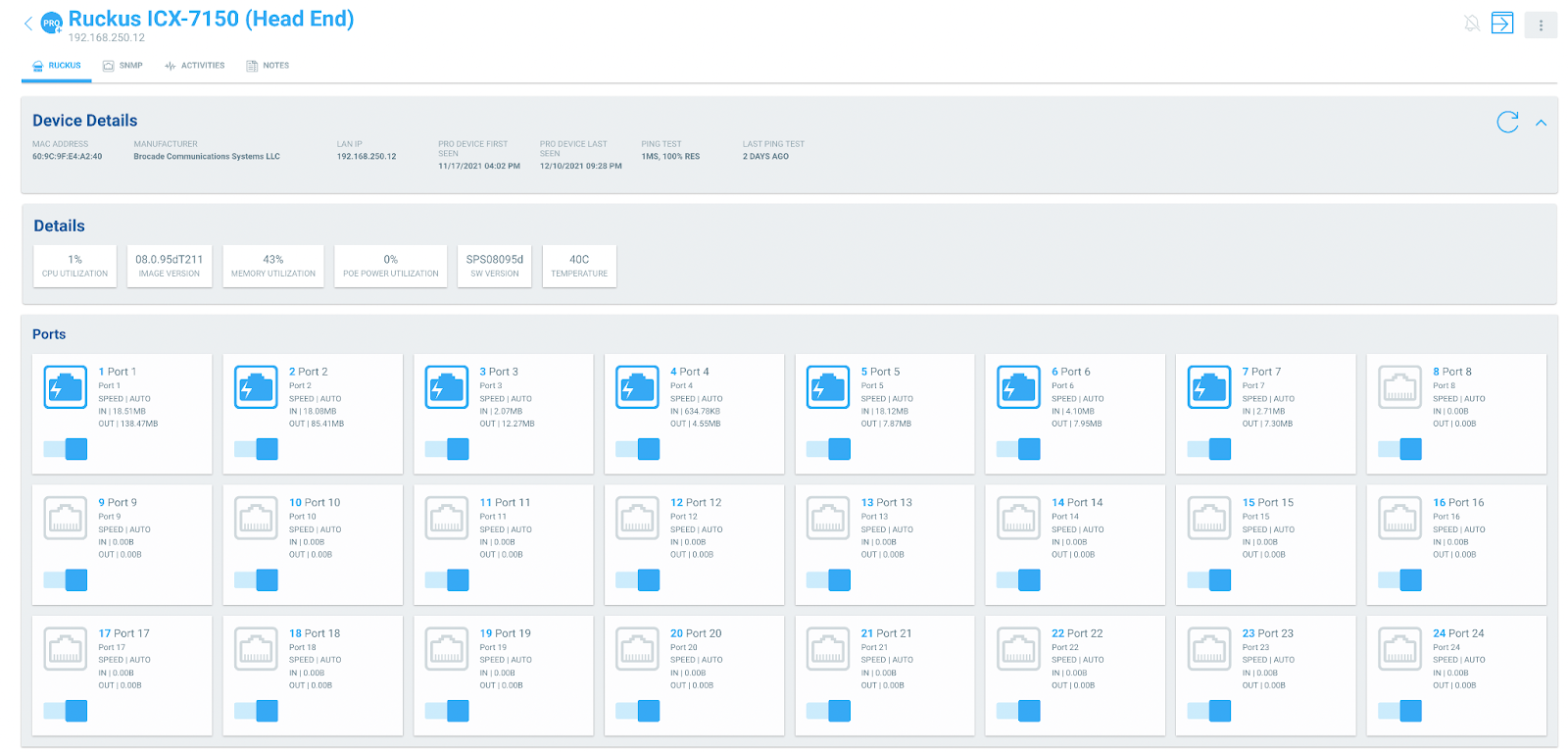
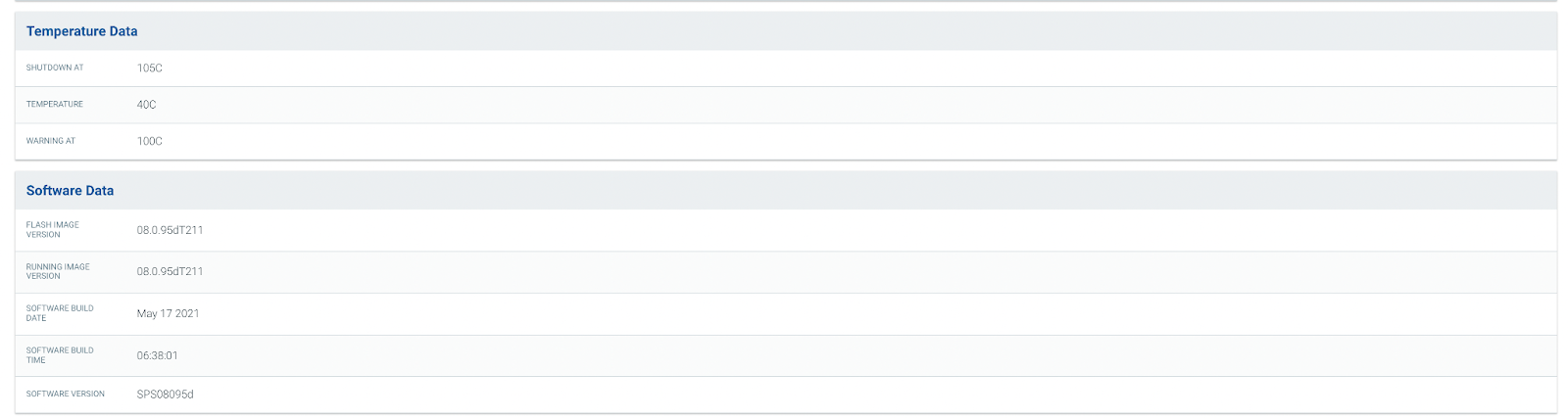
SNMP Support for Access Networks ANX and Ruckus ICX Switches
OvrC Pro adds support for Access Networks ANX and Ruckus ICX Series Switches by leveraging the SNMP protocol. The following features are available for these switches:
Guest Network and VLAN Support with Wi-Fi Management
We've added more tools and capabilities for Wi-Fi Management, enabling you to fully configure and manage your wireless network from the OvrC platform. The OvrC Wi-Fi Management solution now allows the user to set the wireless guest network and VLAN configurations.
As always, we continue to evolve our product based on your feedback. Please provide your thoughts and ideas to [email protected]. Thanks!
As always, we continue to evolve our product based on your feedback. Please continue to provide your thoughts and ideas to [email protected]. Thanks!
Access Networks is the latest addition to the Snap One family of networking brands! With Wi-Fi 6 access points, custom-designed network solutions, and managed services, Access Networks offers networking solutions to help you tackle any job. Join our webinar on October 21st at 11:00 a.m. PST to see how Access Networks products and services can help take your next network install to the next level. Register Now: https://bit.ly/3iTQcqL
*UPDATE: This issue has been resolved. All affected AN-510/810 access points are now fully functional, including the Wi-Fi Management capabilities and connections to the OvrC servers. Please update the rest of your customers' AN-510/810 access points to the newest firmware version.
On Thursday, June 24th, we released new firmware for Araknis AN-510/810 access points. We observed a small population of devices that did not return to an online status after initiating the firmware upgrade.
We have removed the version of firmware until we investigate and resolve the issue. The APs that were successfully upgraded to version 2.1.02 temporarily cannot utilize Wi-Fi Management in OvrC and will show a firmware update icon in OvrC that will not be functional. The APs are otherwise fully functional and there is no action needed. If you must use Wi-Fi Management to update AP configuration for the impacted sites, you may do so by accessing the local UI until the issue is resolved.
Our team is working hard to address this issue. Once the solution is implemented, we anticipate full restoration of services without any action required on your part. We apologize for the inconvenience.
SnapAV is aware of the coordinated disclosure of a series of vulnerabilities (dubbed FragAttacks), related to the functionality of Wi-Fi devices, released by the Industry Consortium for Advancement of Security on the Internet (ICASI) on May 11, 2021. These vulnerabilities are not unique to SnapAV products and appear to impact all Wi-Fi devices operating on the IEEE 802.11 standard.
The vulnerabilities were identified in the IEEE 802.11 implementation of disaggregation and defragmentation.
SnapAV is working to release patches for vulnerable Wi-Fi products. The complete list will be communicated when the timelines are available.
It is important to note that an attacker must be physically within range of the Wi-Fi network of the vulnerable device to exploit these weaknesses. According to the Wi-Fi Alliance, there is no evidence of the vulnerabilities being used against Wi-Fi users maliciously.
Because of this information, SnapAV believes that while it is unlikely that any customers have been affected to date, it is important that dealers apply the patches when available to protect customers.
SnapAV CEO John Heyman sheds some more light on the Access Networks acquisition in an interview with CE Pro, as well as addressing some of the recent upheaval in the distribution side of the business. Read the full interview here.
SnapAV has agreed to acquire Access Networks to provide you with advanced enterprise-grade networking solutions and comprehensive design assistance for today�s demanding jobs.
System Design and Managed Solutions
The Access Networks team of networking experts provide end-to-end network design, products, configuration, monitoring, and support to enable you to confidently deliver reliable, high-performance networks.
Products for the Job
SnapAV is now the best source for all your networking needs. From OvrC-enabled solutions with Araknis and Pakedge, to the advanced and customizable features found with Access Networks, we have the complete solutions you need.
Only Here
SnapAV's agreement to acquire Access Networks is an emphatic example of our commitment to offer industry-leading products and services to our Partners. SnapAV is where professionals will find what they need to deliver reliable, high-performance networks, including products, network design, configuration, education, and support.
How to Purchase Access Networks
If you are already an authorized Access Networks dealer, continue using their portal as you always have. If you are not an Access Networks dealer and would like to purchase products and/or design services, in the short-term you can become a dealer by visiting the Access Networks website. In the future, we intend to make Access Networks products and services available to all SnapAV Partners.
Click here to read the FAQs.
We're proud to introduce the new lineup of Pakedge MS Series Switches, now available for sale on SnapAV.com! Pakedge MS Series Layer 3 Managed Switches with built-in OvrC remote management are designed to handle your most performance-demanding and complex luxury residential, commercial, and pro-AV projects. With five 12-, 24-, and 44-port models in a variety of PoE+ configurations and a range of 1Gbps Ethernet and optional 10Gbps SFP+ uplinks, there's an MS Series Switch to meet the needs of every install.
For tight installs that require PoE/PoE+ on each port, the Araknis Networks 210 Series 8-Port Websmart Gigabit Switch has you covered. Its compact design fits easily inside of a VersaBox or a Wirepath Plastic Enclosure to help you extend your network and power more devices. Setup is easy thanks to Plug and Play capability, and post-install management is a breeze with Websmart technology that allows you to control PoE and IP settings via OvrC. Learn more.
The new wall mount design WAP from Araknis Networks is not only compact and stylish, but it�s also made specifically for on-wall performance. A PoE In Gigabit Ethernet port on the back makes for easy, 2-step mounting, and we�ve even included a PoE Out so you can power a network device directly from the access point. This WAP comes equipped with Wave 2 AC technology, permitting more devices to talk to the access point simultaneously, making it perfect for high-density networks with multiple wireless clients.
Provide faster speeds, even to networks with hundreds of wireless devices, thanks to the all-new Wireless Access Points from Araknis. The 510- and 810-Series WAPs utilize Wave 2 MU-MIMO technology and are ideal for commercial and residential installs alike, because everyone wants faster speeds and a more reliable network. Where traditional WAPs only talk to one wireless device at a time, Wave 2-equipped WAPs simultaneously communicate with multiple devices for faster and more reliable performance. Even better we heard your requests for a round WAP, and now it's here! Pair these new, round WAPs with our square models and offer a design to suit every aesthetic preference.
Tackle your most robust networking install with the new Araknis 310-Series router. Built for the needs of a professional integrator, they support Gigabit WAV throughout, feature a rack-mountable design, and are embedded with OvrC Pro. An embedded firewall helps keep your network secure, while support of numerous VPN technologies allow remote access to your client's network. If you're a professional installer looking for a professional-grade solution, then the 310 series is for you. It has everything you could want in a powerful, 1U rack-mountable router, including an AC power supply, modern faceplate, SFP LAN/WAN interface, and fanless design.
Small AND Mighty- Bring an enhanced networking solution to tight spaces like a VersaBox or structured wiring can with the all-new compact switch from Araknis Networks. Learn more
Expand your wireless network beyond the home or office with the Araknis Networks 700 Series Outdoor Wireless Access Point - check it out.
A new firmware update is available for the AN-100-AP-I-N, AN-300-AP-I-N, AN-500-AP-I-AC, AN-700-AP-I-AC. Get the new Firmware Version 1.1.14 and view release notes here.