
The Araknis 530 Wi-Fi 7 Indoor Access Point delivers faster speeds, lower latency, and tri-band 2x2 performance for residential and small-to-medium business installs. New smart tools like Wi-Fi Optimization, Proximity View, and Bridge Mode reduce install time and eliminate manual tuning. With full backward compatibility, integrators can mix Wi-Fi 6 and Wi-Fi 7 access points in the same project without having to replace every existing AP.
Key Benefits:
*Bridge Mode coming soon for Wi-Fi 6 Series.
Music Streaming Made Easy
We’re excited to expand the Autonomic portfolio with a new generation of music streamers designed to deliver richer audio experiences, greater storage flexibility, and powerful multi‑zone performance. Whether your project needs a compact single‑zone solution or a robust multi‑stream powerhouse, these new SKUs make it easier than ever to design the perfect system.
Featured Products:
M3 Music Server
A refreshed take on Autonomic's popular single-zone player, now upgraded with a 1TB internal drive, making it perfect for projects that require local music storage without sacrificing the compact M-Series footprint.
A powerful new addition to the lineup, the M‑6250 combines Autonomic’s streaming platform with high‑efficiency onboard amplification, enabling a simplified all‑in‑one distributed audio solution. The M-6250 is ideal for projects that demand high performance with fewer components.
Why You’ll Love These New Models
Surpass your customers’ cinema expectations with the high-quality sound from Triad InRoom Dual Subwoofers, capable of delivering full-power output for over a full minute, seamlessly handling even the most demanding audio or movie tracks.
Say goodbye to the "little black box in the corner" with a new industrial design perfect for both behind-the-screen and in-room installations. These subwoofers boast a sleek, modern look that complements any environment.
Deliver rich, immersive sound to your customers’ outdoor entertainment with the new Episode 70V Rock Speakers. These all-weather rock speakers feature a polypropylene cone, high-temperature voice coil, and a 1" titanium dome tweeter for immersive outdoor audio. Episode has improved its rock speaker with an IP67-rated design to prevent water ingress, and a Gore breather equalizes internal pressure to protect the enclosure and driver while blocking water and dust, ensuring reliable, long-term performance. Available in granite or sandstone finishes and 6" or 8" sizes.
Update Enhances Performance, Stability, and Security
A firmware update for Luma PTZ cameras is now available in OvrC. The update resolves several key issues and adds highly requested security and stability features. These features include a new calling preset function, which calls the camera to the home position, and a Return to Home duration setting for certain Smart Tracking scenarios. Users will not need to change or modify their app, NVRs, or camera settings for this update.
For full release notes, click here.
Shop the latest from Marantz
We’re excited to announce the arrival of two game-changing additions to the Marantz lineup: the AV30 AV Processor and the AMP30 Amplifier. These models set a new benchmark for premium audio performance and installer-friendly design.
AV30: The Successor to AV7706
Replacing the trusted AV7706, the AV30 brings enhanced processing power and connectivity options that make integration seamless. With advanced HDMI 2.1 support, expanded control protocols, and custom installation features, the AV30 ensures smooth compatibility with modern home theater systems. Its flexible architecture makes it ideal for multi-zone setups and complex installations.
AMP30: Power Meets Precision
The brand-new AMP30 delivers uncompromising amplification with Marantz’s signature sound quality. Designed for rack-friendly installation, it offers modular connectivity and robust power handling, making it perfect for high-performance distributed audio systems. Whether you’re building a dedicated theater or a whole-home audio solution, AMP30 provides the muscle and reliability you need.
The new Luma Floodlight Camera delivers powerful LED lighting and crystal-clear Wi-Fi video surveillance all in one professional-grade solution. Designed for easy retrofit installation using existing floodlight wiring, it’s the ultimate upgrade for any modern smart home.
Key Benefits:
Deliver long-lasting, crystal-clear outdoor entertainment with the IP55-rated 4K60 HDR10 Veranda 4 Full Shade TV. The Veranda 4 is optimized at 600 nits of peak brightness, backlit by a full-array direct LED screen, and up to 2x brighter than indoor TVs, delivering a glare-free picture. Its anti-glare commercial overlay, combined with a Quarter Wave Plate Polarizer (QWP), ensures readability on the screen even on the brightest days.
Shop New Klipsch Products
The newest Integra Professional Amplifier Series, engineered for reliability, high performance, and long-lasting precision, are now available at ADI | Snap One. Developed in collaboration with custom integrators, Integra delivers some of the highest-performing audio equipment for sophisticated residential and commercial installations.
The Integra Pro Amplifier Series features four amplifier models offering 70V or 8-Ohm configurations to match your customers’ needs. Each unit includes an optional wall controller, an intuitive online setup GUI, and rack mounts for seamless integration.
Klipsch is also bringing their legendary hi-fi sound to the outdoors. The new Courtyard Landscape Speaker System is a purpose-built, 4.1-channel audio solution designed to transform outdoor spaces into immersive listening environments. This isn't your average outdoor speaker. The Courtyard system combines audiophile-grade performance with a rugged, weatherproof design. The system includes:
These latest premium offerings from Klipsch are ideal solutions for professional installers looking to bring precision-controlled audio both the indoors and outdoors.
WattBox is becoming the intelligence at the heart of every install. With the new Power Insights Dashboard, at no extra cost, installers can track outlet-level performance, uncover energy inefficiencies, and analyze data trends that impact uptime. Paired with OvrC for remote management, scheduling, and automation, WattBox gives pros a smarter, more connected way to deploy, monitor, and maintain power.
Power issues aren’t always obvious. Devices reboot, systems drop offline, and it can be unclear whether the problem is the device, the power, or something else. The Power Insights Dashboard is designed to remove some of that guesswork.
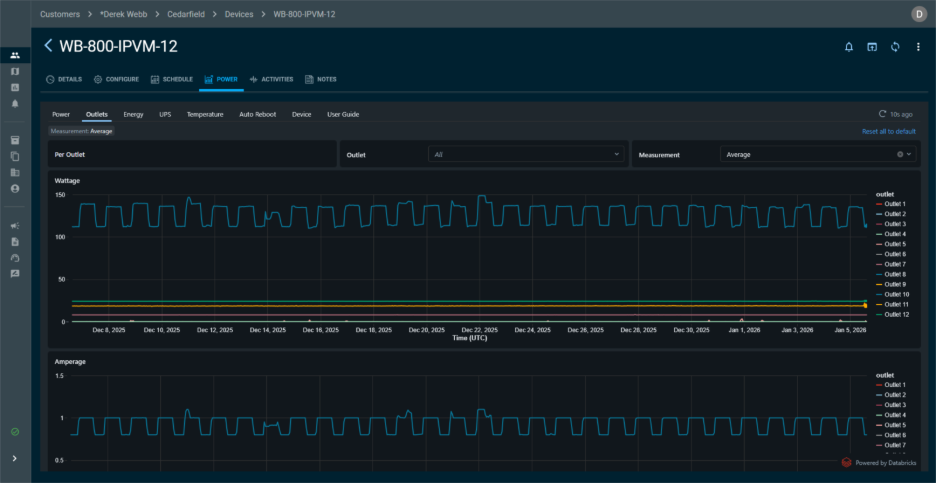
See Power Trends That Matter
Power Insights highlights meaningful trends so you can quickly identify patterns that impact uptime.
This approach keeps the dashboard fast and readable while giving you the insights needed to troubleshoot effectively.
Make Decisions Before Problems Escalate
With actionable insights in hand, you can prevent downtime, reduce service calls, and keep systems performing at their best.
Gain Visibility at Every Level
Whether it’s outlet-level control or device-level insights, Power Insights gives you the visibility you need.
All of this works seamlessly with OvrC, keeping monitoring, control, scheduling, and automation in one place.
Learn How to Leverage Your Data
For pros who want to go deeper, the Power Insights Dashboard User Guide shows how data is collected and how to read the charts.