
The OvrC-Enabled Lutron RA2 Select Demo Kit features real working models of the popular RA2 Select products - designed for you to put your best foot forward when bidding to prospective clients. Housed in a professional-looking carrying case, you can illustrate how lighting control works, show off the product, and answer their questions without having to install a thing! Check it out here.
We've redesigned the Veranda Series with HDR, IP control, and improved aesthetics so you can deliver a great viewing experience to full-shade applications.
SnapAV has joined forces with D-Tools, giving you an opportunity to streamline your business through an exclusive offer! D-Tools is now offering SnapAV dealers a free 90-day trial of its new D-Tools Cloud software�that�s an extra 60 days to use the software, just for our dealers. This powerful, yet easy-to-use solution streamlines the design, sale, and purchasing of AV systems. Learn More
Watch this short video for important details on recent product launches, or click the links below to see the featured products directly.SunBrite Veranda Series TVOvrC 300 Pro HubLuma 510 Series NVRsStrong Vertical MoIP Shelf
Save BIG on some of our most popular in-ceiling speakers! Buy five pairs of Episode 150T thin-bezel speakers, and get each pair for as little as $39.95 each! These thin-bezel, entry-level speakers can be yours for just $39.95/pair, and are ideal for production builders with large-scale projects. They�re compatible with Episode accessories and feature premium construction and install-friendly features you�ll love. Shop Now
As a reminder: today, we are implementing some small price changes to a few of our products, due to the U.S. government's implementation of new tariffs on aluminum, steel, and other goods from China. Although the impact of tariffs will vary across product categories, on average, this means a cost increase of ~2%.Our commitment to you:
Read more about this decision or view and download our new price list.The most up-to-date SnapAV pricelists can always be found on our Pricing page in the Support section. (Login required for full access.)
Watch this video to learn how to use advanced PoE features in the new Luma 510 NVRs.
Over the past few months, the United States government has made changes to its trade policies including the implementation of tariffs. This has affected a variety of industries and products worldwide, including ours.Because of these tariffs, SnapAV will be making a minimal price change to affected product lines on September 17, 2018. While the impact of tariffs varies across product categories, on average this means a cost increase of ~2%.Our commitment to you:
Read more and view and download our new price list, which will go into effect on September 17, 2018.The most recent SnapAV pricelists can always be found on our Pricing page in the Support section. (Login required for full access.)
Fiber Optic HDMI Cables - discreet 4K at Blazing-Fast Speeds! Send high-res video, audio, and data through walls and across distances up to 50m with Binary�s all-new B8 Series Active Fiber HDMI cables. With more install flexibility than traditional active models, these heavy-duty fiber cables transmit 18Gbps of full 4K UHD with HDR wherever it�s needed, and are compatible with the latest HDMI specifications, including HDMI 2.0b. They�re also conveniently CL2 rated to go inside the wall, making any media system more discreet. Learn more.
Introducing the second-generation OvrC Pro Hub (OVRC-300-PRO), with enhanced remote management capabilities all packed into a smaller form factor with more installation options. In addition, we have partnered with Ookla® to provide you with much improved ISP network tests.
As more of your clients adopt Gigabit ISP services, the previous model of the Hub is limiting as it can only measure speeds up to 100 Mbps. The new Hub includes a Gigabit Ethernet port, giving you the ability to measure internet speeds up to a Gigabit in download/upload speeds.
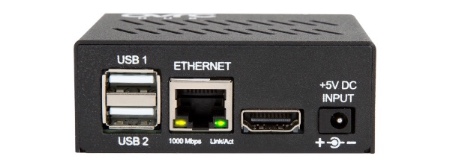
We heard you loud and clear that an accurate measure of the ISP performance is important to servicing your clients. We also learned that doing it reliably across the country is difficult to achieve.
In order to provide you the best available data, we decided to partner with the world’s leading provider of internet testing, data, and analysis today – Ookla. We’ll now use their latest ISP test technology, widely known as Speedtest. This change will lead to more accurate and reliable internet speed results through OvrC.
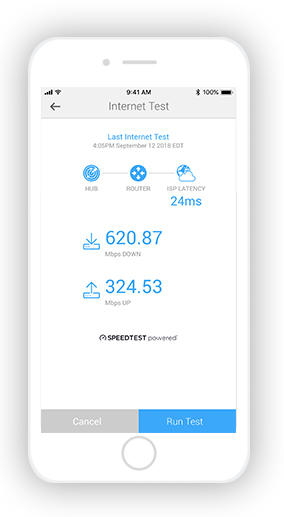
This change will also be applied to previous Hub models via a firmware update, so even your existing deployment of Hubs will provide more accurate and reliable test results moving forward. Of course, the maximum readings you will be able to achieve is 100 Mbps as that is the physical limitation of the port.
We’ve also changed the automated internet testing frequency to 6, 8, or 12 hours. Previously, you could run it every hour, but we found that running it too frequently could negatively impact network performance.
The new Hub features a sleeker hardware that is 23% smaller than our previous model. We’ve also included new bracket options allowing for easy installation on a 1U/2U rack, on a wall, or in a structured wiring can.
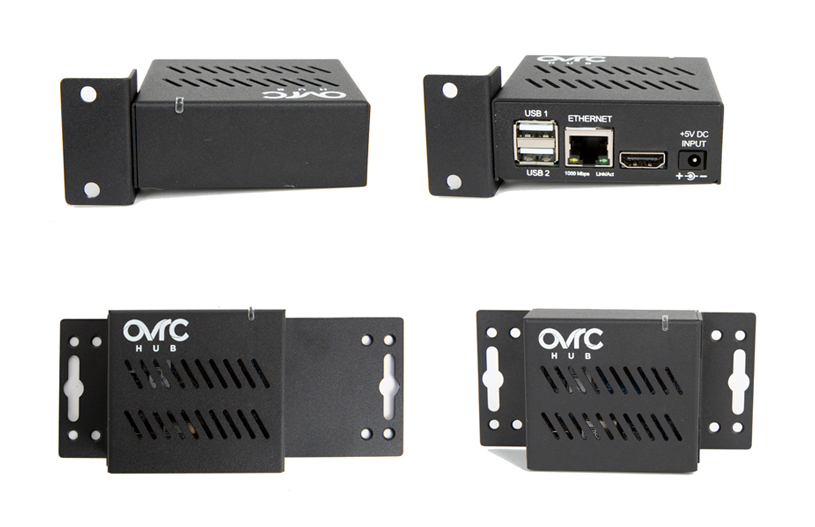
We removed the hassle of using activation codes. Now you can claim the Hub like any other OvrC product, and your location will automatically be enabled for “OvrC Pro.”
Since the initial launch of OvrC Pro, we never stopped evolving its capabilities. We released six major updates since launch, including greater breadth and depth of integrations to products and more advanced ways to troubleshoot and access those devices on the network. With the launch of the new Hub, we’re committing to continued investment in the OvrC Pro platform.
Once inventory of existing Hubs is sold through, we’ll stop offering that model and only carry the Gigabit Hubs.
As always, we continue to evolve our product based on your feedback. Please continue to provide your thoughts and ideas to [email protected]. Thanks!