
Experience the next generation of home theater with the new Marantz Cinema 50, Cinema 60, and Cinema 70 AV receivers. Combining premium sound, elegant design, and advanced connectivity, the Cinema Series delivers the immersive performance Marantz is known for. Whether you're building a dedicated theater or upgrading a media room, these feature-rich receivers offer powerful amplification, support for the latest surround formats, and seamless integration with today's entertainment systems.
Explore the new Cinema lineup and find the perfect fit for your next project.
AudioControl delivers professional audio solutions designed for residential and commercial installations.
From amplification and audio distribution to processing and Dante-enabled networking solutions, AudioControl helps integrators deliver reliable performance and exceptional sound. Now available through ADI, the portfolio provides more options to support a wide range of AV projects.
Key Benefits
Bridge Mode is now available on Araknis Networks X20 Wi-Fi 6 Access Points, extending a popular capability from the X30 Wi‑Fi 7 platform across the Araknis Networks wireless portfolio for indoor and outdoor applications. With a simple firmware upgrade and configuration in OvrC, dealers can wirelessly connect remote locations and devices without running additional cable—ideal for hard-to-reach indoor areas or outdoor structures like detached garages and boathouses.
Why Bridge Mode?
Current Control4 Chime Video Doorbell Reaching End of Sale
A new Control4 Chime Pro Video Doorbell is coming later this year, with pre-orders opening during mid-Q3 around CEDIA. As we transition to the next generation, the current Control4 Chime Video Doorbells will reach End of Sale on August 27, 2026, or while supplies last. The inventory is already limited, and some models are currently out of stock.
What You Need to Know
Affected SKUs
Need a Doorbell Solution in the Meantime?
If you have projects requiring a video doorbell before Chime Pro becomes available, we recommend the Control4 DS2 and Control4 DS3 Door Stations. Both provide a premium front-door experience with seamless Control4 integration, making them the preferred solution during this transition.
Prioritize the Right Customers with Personalized Customer Health Views
Managing a large customer base can make it challenging to quickly identify which issues need attention. When every customer appears in one long list, critical problems can get buried—especially for service teams supporting different territories, customer groups, or responsibilities.
That’s why View by Customer Health helps technicians quickly prioritize the customers they support and focus on the issues that need attention most.
A Smarter Way to Organize Lists
When View by Customer Health is selected, customers are automatically grouped based on whether monitoring is enabled and then prioritized by health status:
This puts actively monitored customers with urgent issues at the top of the list, while customers that aren’t being monitored move lower in priority.
The result is a cleaner, more actionable view that helps technicians spend less time searching for issues and more time resolving them.

Personalized for Every User
A key benefit of Customer Health views is that they’re user specific.
Each OvrC user can choose which customers they actively support, and every technician gets a customer list tailored to their responsibilities and priorities.
While user-specific monitoring has always been available, Customer Health prioritization makes that personalization even more useful by bringing the most relevant customers and issues to the forefront.
Built for Real-World Service Teams
Consider a service team where one technician is responsible for one group of customers while another manages a completely different set. Each technician can enable monitoring for the customers they support, ensuring their list highlights the accounts that matter most to them.
The same approach works for teams supporting multiple locations. For example, a technician based in Tampa may not need customers in Fort Myers prioritized in their list. By enabling monitoring for the customers they manage, they can keep their view focused on their own service responsibilities.
The result? Less distraction, faster issue identification, and a more efficient way to manage customers across the business.
Set Up OvrC to Work for You
Try the Feature in OvrC https://app.ovrc.com/#/login
Getting started is simple:
1. Enable or disable monitoring
Click the Bell notification icon on a customer, location, or device list to see whether monitoring is enabled or disabled.

2. Select a Customer Health view
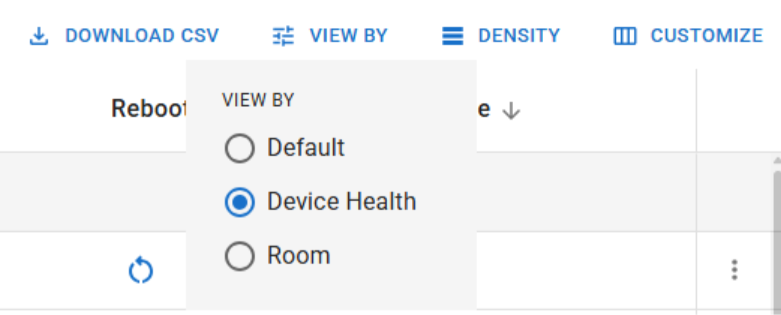
From the customer, location, or device list, select Customer Health, Location Health, or Device Health from the View By menu icon.
3. Prioritize by health
Your list will immediately be organized in this order: Critical, Limited, Healthy, and Unmonitored.
4. Explore other View By options
The View By menu includes additional sorting and prioritization options to help you customize your workflow. Depending on the list you’re viewing, you can sort by options such as Customer Health, Pro Locations, Firmware Update, and more.
Try different views to find the configuration that works best for your team.

Benefits You'll Notice Right Away
Focus on Actionable Work
Customer Health prioritization helps put the most important issues where technicians can see them first. By combining health status with user-specific monitoring preferences, OvrC helps service teams work more efficiently, respond faster to critical conditions, and stay focused on the customers they support.
With Customer Health views, your most important customers and issues are always at the top of the list.
Lux Outlets complete the look of a Control4 Lux lighting project by extending the same elegant design across every wall device. With matching colors, finishes, and faceplates, they help maintain a clean, cohesive aesthetic throughout the project.
Key features:
Shop Axxess Sensor
With Axxess Sensor's latest motion sensor solutions, you can now add wireless, automatic support for motion-dependent functions like lighting, security, occupancy detection, and energy management.
The newest options are available in flush-mount and traditional sensor varieties, with a ball-and-socket joint for easy adjustability. All are available with battery backup and can be integrated into the latest Zigbee Pro Wireless automation controls.
The latest Luma View app update helps streamline monitoring and event review with new camera controls, improved playback navigation, enhanced notification management, and higher-quality video downloads. These updates make it easier to find important footage, manage alerts, and improve the overall user experience.
Features
The Lux No Neutral Dimmer Switch helps Control4 dealers win more Lux opportunities with optimal lighting control in installations without neutral wires at the switch location. Instead of introducing additional electrical costs or walking away from potential projects, dealers can bring Lux Lighting to a broader range of existing homes.
Key features:
DoorBird is updating its portfolio with new-generation video intercom solutions. If you currently specify DoorBird models, now is the time to explore the latest replacements featuring the premium design, reliability, and integration capabilities your customers expect.
Featured Products:
429614004 IP Video Indoor Station
Ideal for door communication in residential, commercial and public buildings featuring 7“ True IPS touch display, and crystal-clear two-way audio
D2201KV Surface-Mount IP Video Intercom System
A premium single-family entry system featuring a 5MP HD camera with HDR and night vision, an integrated keypad, an RFID reader, and a 4D motion sensor
D22DKH Surface-mount IP Video Intercom
A surface-mount multi-tenant IP video intercom system designed for buildings with up to 500 units