
Snap One is excited to announce improvements to OvrC and the OvrC Pro agent!
Until now, several great troubleshooting tools have only been accessible via the local UI of an OvrC Pro enabled device. With this update, we are now making tracert, terminal emulator for SSH and Telnet, and more, available directly through the OvrC application on mobile and desktop devices. These features allow for in-depth, remote troubleshooting of devices as if the technician was locally connected to the network.
New OvrC Tab: “Pro Tools”
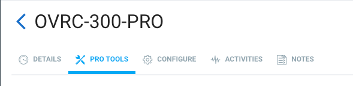
We have consolidated information that is tied to the OvrC Pro agent under a new tab called “Pro Tools” and will show up on the device details of the device that is performing network scans. We have also added a shortcut from the site settings page that takes you directly to the Pro Tools page by clicking on the “MANAGE”. Details follow:
1. Confirm which device is configured as your OvrC Pro agent in Site Settings:
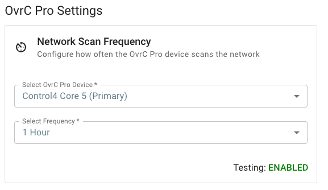
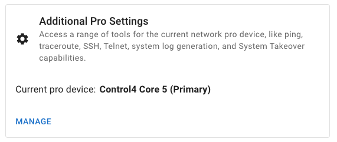
2. Go to that device’s details to access the Pro Tools tab:
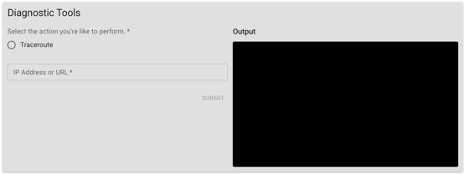
Diagnostic Tools
Trace route, or tracert, is a commonly used troubleshooting tool that technicians use to understand the network and many connectivity issues. With this release, those commands can now be run directly from the OvrC application (web and mobile). Additionally, a terminal emulator has been added for command line entries made over Telnet or SSH. This puts advanced troubleshooting at your fingertips and provides a virtual presence on the network to further reduce truck rolls. These features can be found using the newly added Diagnostics tab on the OvrC Pro enabled device. NOTE: if there are multiple OvrC Pro-capable devices on the project (ex. Araknis router and Control4 CORE controller), this tab is ONLY visible for the device that is configured to perform network scans.
Terminal Emulator
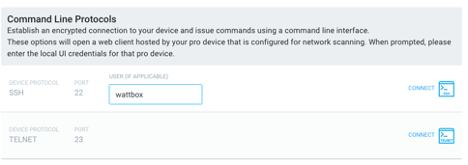
In some cases, there may be a need to open a terminal session to a device on the network. For this, the OvrC Pro Agent has a terminal emulator that uses the OvrC Pro agent as the on-premises device to open a terminal session and connect to a device using telnet (port 23) or SSH (port 22) as these are the most common. This tool is commonly used to interface with non-OvrC enabled devices for tasks like configuring switches that may not have a local UI or configuring the front panel buttons of a PDU.
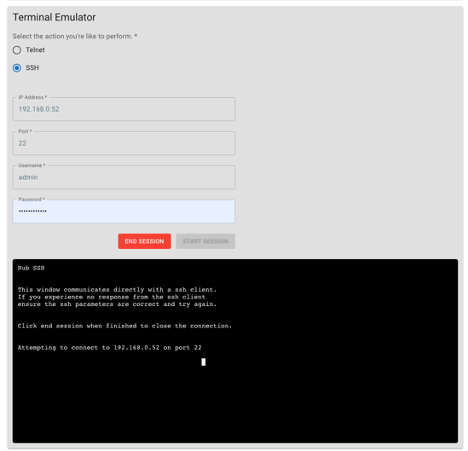
Additionally, this tool will be used for WebConnect sessions that are connecting with Telnet or SSH.
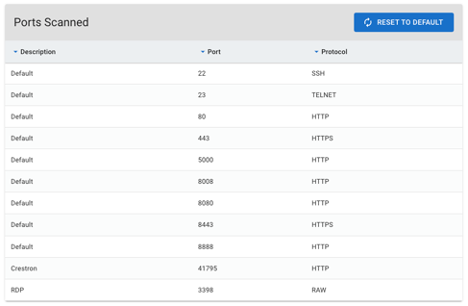
Ports Scanned
The ports scanned by the OvrC Pro agent have been moved under the Pro Tools tab and now only visible on the Pro Agent that is performing the network scans.
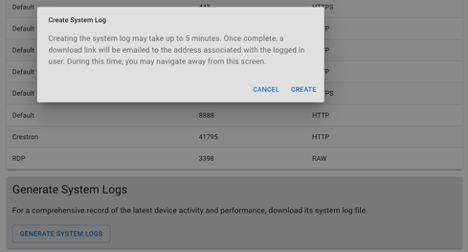
Generating System Logs
There is occasionally the need to pull logs from the OvrC Pro agent at the request of tech support. If logs are requested from the OvrC Pro agent, they can be generated from the Pro Tools tab of the device that is performing the network scans. Because log files can be large and connection speeds vary, the logs will be generated without interruption to the OvrC experience and the user that requested the logs, will be notified via email with a URL where they can be downloaded. This could take up to 5 minutes.
Future Elimination of the Local UI for the OvrC Pro Agent
With these important features moving to the OvrC cloud, access to the local UI of the OvrC Pro agent will no longer be needed and will be removed in a future update to secure the local device and protect the privacy of the customer. For devices like routers and Control4 controllers that are serving as the OvrC Pro agent, this interface was typically found on port 60000 when accessing the device directly. These devices also serve a local UI on port 80 (http) or 443 (https) and there will be no impact to that local interface.
July Blood Drive Underway.
Snap One Partners in the U.S. who donate blood at a Red Cross donation site from July 15 to July 31, 2023, can enter to win $500 in Snap One credit.*
The Red Cross is also giving away exclusive Shark Week t-shirts and a chance to win a three-night New York Getaway, including a private shark dive for two at the Long Island Aquarium.1
1. Find a blood donation center.
2. Eat a meal, then donate.
3. Enter to win Snap One credit.
*See complete Terms and Conditions below.
1 Snap One not responsible for the Red Cross� giveaways.
2023 Snap One Blood Drive Sweepstakes
Official Rules
By entering into this Snap One-sponsored promotion ("Promotion"), participant ("Participant") agrees to abide by these Official Contest Rules and the decisions of Snap One, such decisions which are final and binding in all respects. NO DONATION OR PURCHASE OF ANY KIND IS NECESSARY TO ENTER OR WIN THE CONTEST. A DONATION OR PURCHASE WILL NOT INCREASE YOUR CHANCE OF WINNING.
Potential Prize winners are solely responsible for all applicable: (1) federal, state, and local taxes; and (2) out-of-pocket expenses, associated with Prize acceptance and use.
If you do not wish to receive marketing or promotional mailings or e-mails from the Sponsor, please email: [email protected]
We’re pleased to announce the Strong Carbon Series Display Mounts are a winner of the 2023 InfoComm Best of Show Awards presented by Sound & Video Contractor. Discover the new Carbon Series of Strong Mounts, delivering flexibility and durability for overhead digital signage installations. With modular and pre-configured options available, these mounts offer the perfect blend of customization and convenience. Plus, an online configurator tool is available to help simplify the planning and ordering process. Learn more about the new Strong Carbon Series. Learn more.

With the new Soundbar Adapter Kit added to the innovative MantelMount TV Mounts your customers get the ultimate versatility and adjustability for a hassle-free viewing experience. The new soundbar accessory is compatible with all MantelMount mounts and offers various configurations to fit the widest assortment of soundbars for a custom installation. With the depth and tilt adjustment feature, the soundbar can be perfectly aligned and flush with the TV creating a seamless entertainment system. By integrating the soundbar with the TV your customers get even more utility to create their custom viewing experience every time.
The low-profile FX Luminaire SF Surface-Mounted Wall Lights are designed to be installed so that no hardware is visible, offering a clean aesthetic around the property. The light is positioned at a 40-degree angle to provide wall or ground-washing effects instead of a standard spotlight. A durable IP66/IP67 rating means that these lights will stand up to the elements. The Zoning, Dimming, and Color units of the new release can be controlled with the Luxor controller to create themes and set the appropriate mood. Choose from 30,000 colors! Be sure to check out the entire line of new surface-mounted wall lights including 1LED, 3LED, and Zoning Dimming Color options from FX Luminaire.
The Control4 app has been updated to include new customer-facing account management features. In this update, customers can edit their account details, add secondary users and set their roles, or access new account security features like logging users out of all devices. These new options will be found on the Settings page under the new Account Details and User Management options. Learn More�
Featuring wired speeds of up to 9.4 Gbps, customers can stream music, watch videos, play games, and make video calls with minimal loading times. The new PoE 6 Gateway even offers eight PoE-capable ports to power multiple PoE 6 Access Points, giving optimal Wi-Fi coverage to end users. With a built-in Zigbee smart home hub, customers can control certain Alexa products as well. When you install the eero PoE 6 Gateway combined with eero's new PoE 6 Access Point, you give your customers the power of Wi-Fi 6 as well as easier set-up, system monitoring and updates, and remote management. The good news for you is that you'll roll even fewer trucks, and they'll have faster service.
Your local Snap One Partner Store is now open in Raleigh! Snap One partner stores stock the entire Snap One product catalog, in addition to a huge selection of third-party brands including Sony, Samsung, Ubiquiti, Sonos, Klipsch, Lutron, Luxul, Eero, Ring, Yamaha, and more. See the full list of brands here.
Now, you can shop the industry's most popular brands in one place and enjoy hands-on training, in-person support, and design assistance. Get ready now to shop and pick up products at by filling out this quick authorization form, and and a member of our Sales team will be in touch soon.
Experience a new level of comfort with the auto-update to Halo Firmware v1.4. The Comfort Page, along with its Experience Buttons, have been introduced to the Halo UI bringing hand-held controls for thermostats, fireplaces, ceiling fans, sprinklers and more.
The new BenQ LK936ST projector�s short throw ratio and zoom capability provide the flexibility needed for installations with tight spaces. Limiting the distance between the projector and the screen helps reduce shadows, glares, and other distractions. While the 3D Keystone and Corner Fit technology combined with the cinematic grade 92% Rec.709 color coverage and 4K resolution provides ideal projection alignment to bring presentations and entertainment to life. The LK936ST puts out 5,000 lumens and is built to last thanks to hermetically sealed DLP chips. Check out the newest BenQ 4K Laser Projector for your next home, office, or specialty installation job to provide your customers with clear distortion-free videos.