
The BenQ LU710 and LU930 use a dual color wheel and a powerful 4000-lumen and 5000-lumen laser, respectively, to cast full-color coverage onto the screen. The LumiExpertTM technology detects ambient light and adjusts its contrast to ensure picture quality and clarity despite conference room lighting conditions. BenQ projectors are ideal for unique installations and specialty environments thanks to their 360-degree installation ability, versatility, and power. Both the LU710 and the LU930 are built to last and reduce maintenance costs with 20,000-hour heat-resistant DLP chips and IP5X dustproof ratings.
Have you noticed any changes to our Search feature? It's only one of the many updates we've made to our Partner Portal recently. Snap One is always improving. We welcome your feedback and leverage it to implement product and service enhancements, plus create better Partner resources and tools to help you efficiently run your business. Thanks to your feedback, we've made some improvements to the Snap One Partner Portal (www.snapav.com ) experience. Here are some highlights:
The new enhanced search function is now lightning fast and incorporates an image search panel allowing you to find what you need and add it directly to your cart. Documentation and resources were also added. We'll continue to improve our search capabilities based on Partner feedback. Feel free to give us your feedback using the red feedback button.
Faster load times and overall performance, up to 60% increases on certain pages.
Whether you need to troubleshoot a quick question from the field using the Tech Community, quickly peruse your tech�s training and certification or learn something new, we've added ways to easily manage your team's education and training.
No need to call into Partner Support to add or remove users for the Snap One portal, now you can easily view, create or edit users with User Management.
Added Control4-specific features:
If you're interested in learning more about becoming Control4 authorized, you can learn more here.
The Account Balance section was redesigned and made available to all Partners, so you can view account balances immediately. In the coming months, invoices will be available online to streamline payment.
Added support for customizing Triad products.
If you're interested in learning more about becoming an authorized Triad dealer, you can learn more here.
Are you looking to drive efficiency in your organization? Join Snap One and Cabling Installation & Maintenance for Efficiency Unleashed: How to Save Time with Streamlined Multi-Display Setups webinar. Learn how to reduce the time it takes to set up a multi-display install and create an optimal viewing experience for your customers as we share solutions from Binary MoIP, Strong, SunBrite, and Control4. Learn More
In response to your feedback – THANK YOU!! – we are excited to announce the next round of improvements for the OvrC mobile application. We heard you loud and clear that the new device list was more difficult to navigate and was missing some key functionality that required extra clicks to perform common actions like Reboot and Update firmware.
With this release, we have added an optional “card view” within the device list. This expands on the “grid view” that was released earlier this year. The advantage of the card view is that it’s showing each device’s important information in a card and surfacing quick action buttons for rebooting a device or initiating an update if available. The grid view is still available to perform bulk actions like setting the monitoring bell, deleting a device or assigning devices to a room. The combination of the two views provides easy readability as well as power-user features in the palm of your hand. Make sure to update your mobile application to benefit from this new look.
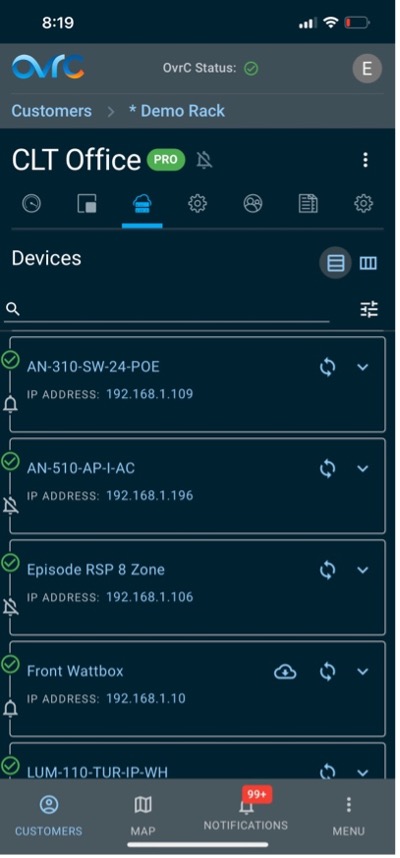
One item to note, the monitoring bell is now informational on the device list and toggling the state can being done from the grid view or in the device details page. This was done based on feedback that the device bell states are rarely changed after initial configuration but seeing the information was still important.
Does Snap One plan on charging for OvrC in the future?
Why does OvrC it say devices are offline when they are not?
And Why move local configurations to OvrC?
Those are some of the questions we address in our first-ever Ask Me Anything (AMA) Session.
Answering questions today, we have:
Our mission here is to build trust and to offer some transparency, as we answer questions and respond to feedback that was submitted via our AMA form. We also plucked some questions directly from integrator forums.
https://vimeo.com/837492625/c60348daae?share=copy
Suggested read:
A Great Responsibility: Snap One Invests in Cloud as OvrC Becomes More Essential
Are you interested in shaping our new suite of troubleshooting and diagnostic tools? Then we invite you to join our open BETA test and share your insight on some new tools we are adding to OvrC. Pro Tools can be accessed through the Customer's Site Settings tab, or from the Device Details page for the site's OvrC Pro Device. The new tab in OvrC will provide a more secure, single-point solution for troubleshooting and management and will replace terminal access. Your feedback as a BETA tester is crucial for developing the features that function to your standards and helps us make better tools for you.
Take on the most demanding of network installs with the new Araknis Networks 520 and 220 series routers. Both feature a multi-Gigabit LAN and WAN interface for high bandwidth installs. The 520 series has a dual WAN connection for load-balancing and link failover while the 220 series offers single WAN and a compact form factor to fit racks, wiring cans, walls, or tabletops. Every Araknis router is embedded with OvrC Pro to extend your visibility and access to the entire network of IP devices.
The latest wall switches and keypads from Lutron are now available. With a variety of combinations, configurations, and customization options there is something to fit your client's home. Offering available features such as dedicated raise and lower buttons, all on or all off, and backlight users have a level of control over a variety of applications. As a bonus, Lutron even offers one pre-paid custom engraved button kit with keypads. Control and connectivity continue to work even if the network goes down. Check out the latest offerings to improve your customer's experience.
No matter the space or the design, the new release of IPORT cases, docks, and mounts combine to meet the aesthetic and fit as needed while still offering safety and security for iPads. The precision-machined aluminum components give you the durability and look needed to blend into the spaces as needed. Have confidence in the protective cases protecting iPads from falls of up to 2 meters. For added protection and security you can lock the cases to the base or wall mounts. Explore the connected world of IPORT cases, docks, and mounts.� Learn more.
Triad Passive Soundbars elevate the Triad audio experience, delivering the high-end sound that Triad is known for, alongside upgraded technology and aesthetics. Customers can choose from the existing 3" and 4" driver offerings, plus new 5" or 6" sizes, three configuration options, and custom lengths up to 86". Choose finishes from Triad's preselected colorways, custom veneers, or match a preferred paint color.
Triad's Passive Soundbars effortlessly merge performance and aesthetics to deliver an audio experience that looks as good as it sounds.