Sonos is expanding how and where users can listen to their favorite entertainment with their new Roam 2 speaker and Ace headphones.
Before heading out the door this summer, grab the IP67-rated Roam 2 portable speaker with Automatic Trueplay for detailed sound anywhere. At home, use it as a smart speaker to stream entertainment. It's voice-enabled for added convenience.
Customers can rely on the new Ace headphones for crystal-clear sound, premium call quality, and profound home cinema sound. Powerful bass, lossless audio, and all-day comfort mean users can practically live in their new headphones.
We are delighted to announce that Apple Music, the streaming service and application, is officially integrated and streaming for Control4 customers with an active Connect service.
Control4 unlocks the Apple Music experience, giving you features including Listen Now, and its expertly curated and collaborative ad-free playlists, podcasts, Apple Radio, and access to your personal music library. Moreover, Control4 brings to life high-resolution audio that provides exquisite clarity, boasting an impressive 192KHz sample rate and 24-bit depth.
Control4's implementation of Apple Music was developed using officially published Software Development Kits (SDKs) and Application Programming Interfaces (APIs) rigorously tested and validated by Apple, ensuring seamless integration.
For Control4 Connect Customers:
Apple Music is available to Control4 Connect customers, demonstrating our first step as we continue to add new features and functionality and improve customer satisfaction.
For Control4 4Sight Customers:
To fulfill this much-anticipated and long-requested improvement, we are pleased to announce that we are extending Apple Music access to our existing and legacy customers, as well as our active and new 4Sight subscribers.
Let's Make Beautiful Music Together
With Control4's natively integrated Apple Music solution, Partners can offer customers a fully immersive audio experience through personalized scenes and automations, going beyond simply initiating a playlist stream.
Let personalized and curated playlists accompany you throughout your day, from waking you up to helping you unwind effortlessly. Apple Music infuses every moment with a perfectly curated, ad-free soundtrack, transforming ordinary into extraordinary.
To use Apple Music, the following are required:
Customers Ready to Enjoy Apple Music
Shortly after launch, Control4 will send targeted content to customers who meet the requirements, along with step-by-step instructions for enjoying Apple Music. Customers can add Apple Music through Manage Music. Alternatively, partners can add it locally or remotely using Composer Pro or Composer Express.
Customers One Step Short of Enjoying Apple Music
A large number of customers have CORE and Connect/4Sight and only require an update to OS 3.4.2, which can be easily done remotely using OvrC. Keeping your customers up to date with the latest Control4 OS will ensure they are always ready for the newest features. After the update, you can use our Listen on Apple Music guide to announce Apple Music to them.
Apple and Apple Music are registered trademarks of Apple, Inc.
Access Networks switches are designed for tough network environments that require peak performance and capabilities. With advanced Layer 3 functionality, enterprise-grade components, and sophisticated network traffic management, these switches ensure optimal performance where milliseconds of latency matter.
Give your customers an intelligent outdoor cinema setup with this limited summer savings opportunity. The Veranda 3 Outdoor Smart TV offers all the capabilities you’d expect from a premium TV, such as built-in Wi-Fi for easy streaming and Dolby Vision™ & Dolby Atmos® to bring every scene to life. It is also designed to withstand summer’s wrath with an IP55 rating and produces 1,000 nits at peak brightness, making it ideal for full-shade viewing.
*Terms and conditions apply. Sale valid from 07/01/2024 to 08/04/2024.
Introducing the Araknis AN-320 Entry-Level Wireless Access Point! Great for smaller projects, single-family homes, and apartments, this Wi-Fi 6 device supports OFDMA, MU-MIMO, and more for enhanced network capacity and reliability. With a 2x2 antenna design and peak data rates of up to 1800Mbps, make it your go-to solution for lightning-fast connectivity.
We are excited to unveil the latest addition to the Halo and Halo Touch Comfort Experience: Pools/Spas. This feature ensures that your space's pool temperature is always perfect, the jacuzzi jets are flowing, and effectively shuts down the pool pump when needed.
Customers can expect to enjoy a variety of features, including:
Pools and Spas: Easily manage and monitor the status of your pool (indoor or outdoor) or spa (on every patio) from the remote's list view.
Deep Sleep Wake Time: The time it takes your remote to exit deep sleep mode is significantly reduced.
Performance Improvements: We've made several bug fixes and changes to make your Halo experience more seamless.
We’ve made it easier for you to design and order Vibrant Linear Lighting by offering bundles that include all the necessary products. We handle the product calculations, freeing you to focus on other project tasks. Our nine new kits are perfect for beginners and experienced lighting teams who want a hassle-free ordering process.
Each kit contains everything you need to light up any space, such as the Vibrant Linear Lighting Zigbee Starter Kits and the Vibrant Linear Lighting DMX Starter Kits. For easy control of your fixtures, consider using the DALI Bus Kits.
By purchasing a bundle, you can save up to $100 compared to buying individual products.
We're excited to share that Snap One is now part of ADI Global Distribution, expanding our smart technology offerings and distribution capabilities across the residential and commercial markets.
Together, we will offer a wide selection of both proprietary and third-party products through an omni-channel shopping experience with an extensive physical branch footprint and industry leading digital capabilities.
With increased product breadth, local availability, and broad industry expertise, we're confident that our combined business will meet your needs, exceed your expectations, and deliver even greater value to you.
See how Snap One Partners at Logic Integration simplified this customer's smart home and made it easy to support with OvrC and Control4. If you love how the project looks, and need more marketing materials for your business, you can utilize high-quality marketing assets created during this install here!
The Snap One team is always amazed by the phenomenal projects Partners work on that's why we want to highlight your recent installs. Fill out the form found here to join the Snap One Forging Partnerships program and let us share your success.
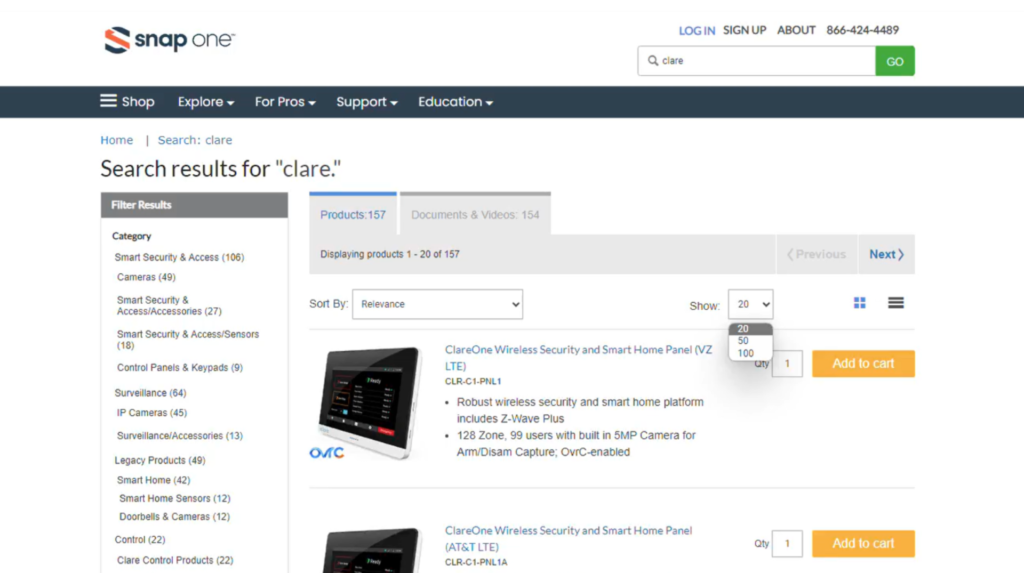
To better improve your Snap One® Portal shopping experience, just select between multiple quantities of product listings. Choose from 20, 50, or 100 product listings in the “Show” dropdown to browse all your options.