
With performance in mind, the Marantz AV10 offers all seven of its HDMI inputs in 8K. With 15.4 channel processing and outputs, it can create the ideal loudspeaker configuration to give you immersive sound. The Marantz AV10 includes a remote and accessible front panel, so users are experts from day one.
The AN-520 Wi-Fi 6 Wireless Access Point supports higher network capacity and enhanced reliability with support for OFDMA, MU-MIMO, 1024 QAM, 160MHz Channel Bandwidth, and BSS Coloring. It delivers peak data rates of up to 3000Mbps with its 2x2 antenna design. And with a 2.5Gbps LAN port-in, Araknis AN-520 fully supports multi-gig jobs. OvrC cloud configuration makes it easy to configure, monitor, and troubleshoot the network remotely, eliminating hours of manual setup time.
Announcing, Episode Lynk, a simple audio source solution. Lynk connects to an amp, enabling users to play audio from mobile devices to their audio system via Bluetooth, Airplay 2, Chromecast and Spotify Connect. Pro-level features like hardline ethernet setup provide reliable performance, alongside integration with OvrC for remote capabilities. It's user-friendly, with fast setup and no additional app required, using native control from the mobile device.
Make any amplifier smart, and easily allow users to seamlessly integrate native music streaming from their devices with Episode Lynk.
Sign up to attend one of the multiple training sessions scheduled through the month of February in Texas and Florida. The sessions are designed to maximize your techs', engineers', and project managers' understanding of Atlona's feature-rich products. Lunch will be provided, and attendees will be entered to win an Atlona Captivate speakerphone.
For the full list of details, dates, and locations for each session click HERE
Snap One is offering an expanded selection of Marantz AVRs and CD players to bring premium sound offerings to your customer's home. The Cinema 50 & 60, have a broad selection of inputs/outputs, so you can give customers a customized performance package. For customers using headphones, the CD 60's headphone jack allows for great quality in an intimate experience.
To start the new year, we have made some exciting new changes to OvrC, including the ability to create Rooms, Network Health, and other improvements.
Introduction of Rooms
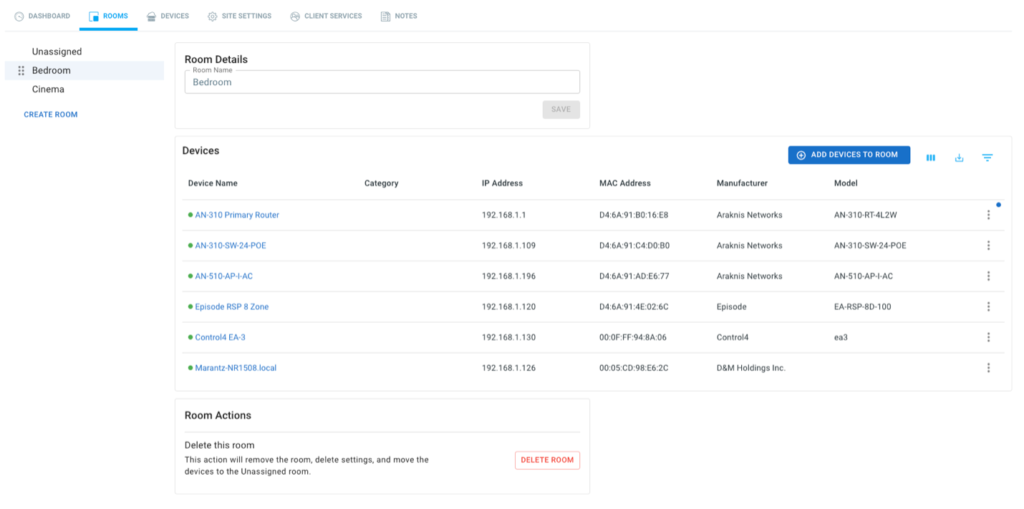
Navigating and finding specific devices or groups of devices on a network can be challenging, especially with the increasing number of devices being connected. OvrC has introduced the Rooms feature to address this issue, which allows for better organization and efficient navigation by grouping devices together. As seen with early testers, this can be applied in various ways, such as grouping devices by buildings, floors, or spaces. Additionally, the Rooms feature also facilitates faster troubleshooting.
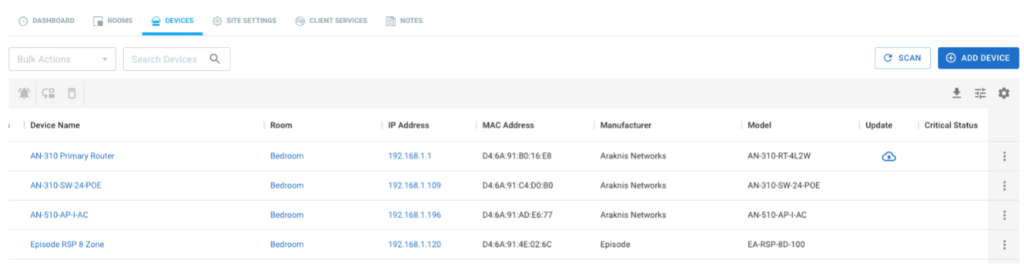
New Device List
Along with the Rooms feature, we have also improved the device list to provide better functionality. The new table layout provides lots of new functionalities:
To learn more about Rooms and Device List, please visit the Snap One Tech Community.
Network Health
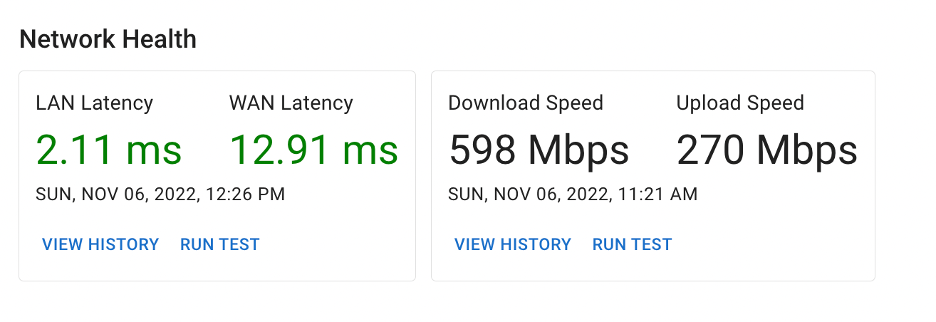
Previously known as Internet Speed Test, Network Health has been changed on the Location Dashboard to provide more information. Speed tests alone cannot provide enough information to determine if a customer’s network is running as expected. OvrC now measures latency, or response time, for the internet and local network separately.
In preparation for this feature, we have proactively configured these settings on existing locations. This means that Network Health should already be working in your locations without any action needed by you.
All OvrC Pro locations have already been configured to use 8.8.8.8 as the target for measuring WAN latency as well as a target device has been selected for measuring LAN latency. Additionally, changes to speed test frequency have also been applied.
To learn more about Network Health, please visit the Snap One Tech Community.
Fixes and other improvements
With this update we have addressed some underlying bugs within OvrC
As always, we continue to evolve our product based on your feedback. Please continue to provide your thoughts and ideas to [email protected] or through the user feedback section of the web and mobile applications. Thanks!
Introducing the all-new X20 family of NDAA-compliant Luma cameras and NVRs. Luma's new product line offers easy-to-install, high-quality surveillance solutions with multiple, attractive end-user features. Your clients will enjoy the benefits of AI-filtered events, more accurate notifications, additional privacy measures, and advanced recording playback; all through the new Luma View app. Installation is simple thanks to Luma's discreet form factors and streamlined control system integration. And, when you use OvrC you can save up to 50% of your time setting up and configuring a Luma system. Learn more about the new and improved Luma line
You can offer your clients best-in-class performance in a compact package. The Marantz Cinema 70 might be small, but it offers six HDMI ports, of which three are 8K compatible. Marantz�s legendary ecosystem and connectivity mean you can work the whole system with the push of a button or voice command from Amazon, Google, or Apple controls. Learn more.
Your local Snap One Partner Store is now open in Idaho! Custom Plus stores stock the entire Snap One product catalog, in addition to a huge selection of third-party brands including Sony, Samsung, Ubiquiti, Sonos, Klipsch, Lutron, Luxul, Eero, Ring, Yamaha, and more. See the full list of brands Custom Plus carries here.
Now, you can shop the industry's most popular brands in one place and enjoy hands-on training, in-person support, and design assistance. Get ready now to shop and pick up products at Custom Plus Boise by filling out this quick authorization form, and and a member of our Sales team will be in touch soon.
Your local Snap One Partner Store is now open in Kansas City! Your store stocks the entire product catalog available on the Snap One Partner Portal and a huge selection of third-party brands, including Sony, Samsung, Ubiquiti, Sonos, Klipsch Lutron, Luxul, Eero, Ring, Yamaha, and more. See the full list of brands here. You'll enjoy same-day product pickup plus in-person training and support when you shop locally.
To get access to the Snap One Partner Store website, visit the login page and click Forgot Password. Your username is your email address. Once you submit your information, you'll receive instructions for resetting your password and accessing the site. Please keep an eye on your junk mail folder. If you are having trouble accessing the site, please reach out to your rep or a member of the branch staff for assistance. Learn More.